Last updated: November 1, 2026
Table of contents
- Quick Answer: My Top Picks
- How I Chose These Laptops and Where the Numbers Come From
- The IP Rating Decoder: What the Numbers Really Mean for Water
- Best Waterproof Laptops Compared
- Lab Numbers Side by Side
- Best Waterproof Laptops (2026): 5 Rugged Machines That Shrug Off Rain, Mud, and Even a Fire Hose
- 1. Panasonic Toughbook 40 Mk3 : Best Waterproof Laptop Overall
- 2. Dell Pro Rugged 13 Extreme : Best Compact Waterproof Laptop
- 3. Getac B360X : Best for the Newest Chips and the Brightest 14-Inch Screen
- 4. Durabook Z14I : Best Battery Life and the Only Fanless Pick
- 5. Samsung Galaxy Tab Active5 Pro + Rugged Slim Keyboard: The Only Truly Submersible Pick
- Warranty and Accidental Damage Coverage Compared
- My Water Survival Routine (Things the Spec Sheet Won’t Tell You)
- Buying Guide: How to Choose a Waterproof Laptop
- Frequently Asked Questions
- Final Verdict
- Sources
Most laptops don’t die in a big dramatic moment. Nothing sparks and nothing smokes. A thin line of coffee slips under a keycap, finds a power rail, and the screen goes black halfway through a sentence. That’s a $2,000 machine gone over about half a cup of liquid.
Now think about a different scene. A laptop is sitting open on a pickup tailgate in a downpour. Someone is hosing caked mud off its keyboard while it’s still running. A lineman in thick gloves taps through a pipeline inspection form with rain streaming down the screen, and the touch input doesn’t miss. That isn’t an ad. For the five machines in this guide, it’s an ordinary workday.
Here’s the part nobody explains properly. “Waterproof” is one word on a box, but it can mean very different things. A splash-resistant laptop and one that survives a pressure washer are miles apart. A laptop that survives a pressure washer and one that survives falling off a dock are just as far apart. Not one mainstream laptop on sale today is certified to go fully underwater. If you buy the wrong rating, you spend $5,000 on false confidence. If you buy the right one, you’ll probably retire the laptop before it gives up.
So I did the homework I wish someone had done for me. I took the newest model from each serious rugged brand, dropped anything that’s already been replaced, and lined up the independent lab numbers side by side. I also built two tools I couldn’t find in any other roundup: an IP rating decoder written in plain English and a “what actually survives” scenario matrix. Together they should keep you from paying for protection you don’t need, or skipping protection you do.
Quick Answer: My Top Picks
- Best overall: Panasonic Toughbook 40 Mk3. It’s IP66 sealed, has a 1,200-nit screen, runs up to 24 hours with two batteries, and has the deepest modular ecosystem of any rugged laptop.
- Best compact waterproof laptop: Dell Pro Rugged 13 Extreme. It carries the same IP66 rating in a 5.33 lb body with a 1,400-nit display.
- Best for the newest chips and brightest 14-inch screen: Getac B360X. It pairs Intel Core Ultra Series 3 with a 14-inch, 1,400-nit display in a 13.3-inch footprint.
- Best battery life, and the only fanless pick: Durabook Z14I. It ran 10 hours 4 minutes on a single battery in independent testing, and its warranty covers accidental damage for three years.
- The only truly submersible option: Samsung Galaxy Tab Active5 Pro with the Rugged Slim Keyboard. It’s IP68 rated for 1.5 meters of fresh water for 30 minutes, and it costs a fraction of the others.
How I Chose These Laptops and Where the Numbers Come From
I’ll be straight with you: I didn’t throw five $5,000 laptops into a lake. That would prove very little, since a single dunk isn’t a standardized test. Here’s how this guide was put together:
- Ruggedness claims (IP ratings, drop heights, MIL-STD-810H testing, temperature ranges) come from each manufacturer’s official certifications and spec sheets.
- Performance, display, battery, and thermal results come from independent labs that publish their methods. The main ones are RuggedPCReview, which has tested rugged computers for decades, Notebookcheck, PCMag, TechRadar, Tom’s Guide, StorageReview, and LaptopMedia. I name the lab next to every measured number.
- Newest generation only. If a newer version was on sale by November 1, 2026, the older one didn’t make the list. That’s why you’ll see the Toughbook 40 Mk3 rather than the Mk2, the Dell Pro Rugged 13 Extreme rather than the RA13250, and the Getac B360X rather than the B360 G3.
- One brand, one pick. Five brands, five recommendations.
- The rating has to be real. Every laptop here is IP66 certified, and the tablet pick is IP68. Semi-rugged IP53 machines show up only in the decoder below, for comparison.
- Brand-new models get honest baselines. Three of these 2026 machines are so new that no independent lab has published a full review yet. For those, I show measured results from the direct predecessor on the same platform and label them clearly. A labeled baseline is useful. A made-up number isn’t.
The IP Rating Decoder: What the Numbers Really Mean for Water
IP ratings come from the international standard IEC 60529. The first digit measures protection against dust and solids on a scale of 0 to 6. The second digit measures protection against water on a scale of 0 to 9.
| Rating | Dust protection | Water protection, in plain English | Typical devices |
|---|---|---|---|
| IP53 | Dust-protected, not dust-tight | Spray up to 60° from vertical, roughly rain falling on the laptop | Semi-rugged laptops (Dell Pro Rugged 14, Toughbook 55) |
| IP54 | Dust-protected | Splashes from any direction | Some “business rugged” laptops |
| IP65 | Fully dust-tight | Low-pressure water jets from any angle (6.3 mm nozzle, 12.5 L/min) | Older fully rugged laptops |
| IP66 | Fully dust-tight | Powerful water jets from any angle (12.5 mm nozzle, 100 L/min, eight times the IP65 flow) | Toughbook 40, Dell 13 Extreme, Getac B360X, Durabook Z14I |
| IP67 | Fully dust-tight | Temporary immersion to 1 m for 30 minutes | Rugged tablets and phones (rare in laptops) |
| IP68 | Fully dust-tight | Immersion beyond 1 m, with depth and time set by the manufacturer | Samsung Galaxy Tab Active5 Pro (1.5 m, 30 min) |
A detail that trips up a lot of buyers: the water digits don’t stack. An IP66 laptop is not automatically IP67. The jet test and the immersion test are separate, so a laptop can survive a fire hose and still fail if it sits at the bottom of a bucket. Tom’s Guide said plainly in its review that the Toughbook 40 can’t be fully submerged. I’ve also seen a news item suggest a Toughbook could survive a brief dunk. IP66 doesn’t certify that, and I wouldn’t stake a deployment on it.
MIL-STD-810H isn’t a pass-or-fail certificate either. It’s a catalog of U.S. Department of Defense test methods. A manufacturer can run one drop test and still print “MIL-STD-810H” on the box. Ask which methods were tested and with what parameters. Durabook is a good example of doing it properly: its Z14I spec sheet lists the exact drop procedure, 26 drops from 6 feet onto plywood over concrete.
The “What Actually Survives” Scenario Matrix
| Real-world scenario | IP53 semi-rugged | IP65 | IP66 (the 4 laptops here) | IP68 (Tab Active5 Pro) |
|---|---|---|---|---|
| Coffee or soda spilled on the keyboard | ✅ Usually | ✅ | ✅ | ✅ |
| Working in steady rain | ⚠️ Briefly, with ports closed | ✅ | ✅ | ✅ |
| Hosing off mud or a wash-down | ❌ | ⚠️ Low pressure only | ✅ | ✅ |
| Wind-driven rain plus fine dust (desert, quarry) | ❌ Dust gets in | ✅ | ✅ | ✅ |
| Dropped in a puddle and grabbed within seconds | ❌ | ⚠️ Not certified | ⚠️ Not certified | ✅ |
| Fell off a dock into 1–1.5 m of fresh water | ❌ | ❌ | ❌ | ✅ (up to 30 min) |
| Saltwater exposure | ❌ | ⚠️ | ⚠️ Look for salt-fog testing | ⚠️ Rinse afterward; ratings use fresh water |
| Used in rain with a port door open | ❌ | ❌ | ❌ | ❌ |
That last row breaks more rugged laptops than anything else. Every IP rating assumes the port doors are shut and latched. RuggedPCReview noted that the doors on Getac’s B360 need a firm push before they seal completely. That’s not a design flaw. It’s a habit your team needs to learn.
Best Waterproof Laptops Compared
| Panasonic Toughbook 40 Mk3 | Dell Pro Rugged 13 Extreme | Getac B360X | Durabook Z14I | Samsung Galaxy Tab Active5 Pro | |
|---|---|---|---|---|---|
| Best for | Best overall / modular | Most portable fully rugged | Newest chips, brightest 14″ | Battery life, fanless, warranty | True submersion on a budget |
| IP rating | IP66 | IP66 | IP66 | IP66 | IP68 (1.5 m / 30 min) |
| Drop rating | 6 ft (180 cm) | 6 ft | 6 ft (while operating) | 6 ft (26 drops) | 1.2 m bare / 1.5 m in cover |
| Processor | Core Ultra 5 235H / Ultra 7 265H | Core Ultra 5 335 / 338H / X7 368H | Core Ultra 5 336H / Ultra 7 356H, 366H / X7 358H | Core Ultra 5 125U–Ultra 7 165U | Snapdragon 7s Gen 3 |
| Display | 14″ FHD, 1,200 nits | 13.3″ FHD, 1,400 nits | 14″ 1920×1200, 1,400 nits | 14″ FHD, 1,200 nits rated | 10.1″ WUXGA, 120 Hz |
| Weight | From 3.4 kg (about 7.4 lb) | 5.33 lb (2.41 kg) | 2.38 kg (about 5.25 lb) | 7.94 lb (3.6 kg) | 683 g (1.51 lb), tablet only |
| Operating temp | -29 to 63 °C | -29 to 63 °C | -29 to 63 °C (B360 platform) | -29 to 63 °C | Standard tablet range |
| Battery | Up to 12 h / 24 h with 2 batteries (claimed) | 53.5 Wh hot-swap, room for a second | Dual hot-swap (Pro); predecessor measured 10:11 h | 10:04 h measured on 1 battery | 22:36 h web browsing (measured) |
| Price (USD) | From about $5,419 (reseller) | $5,256 (Dell.com) | Quote-based; B360 G3 listed at $5,405–$6,166 MSRP | $3,599 MSRP | $659–$839 + $155 keyboard |
| Warranty | 3 years | 3 years mail-in; accidental damage optional | 3-year Bumper-to-Bumper | 3 years with accidental damage | Varies by region |
Lab Numbers Side by Side
Rugged laptop makers aren’t trying to win benchmark charts. Even so, these results show how each platform behaves when it’s working hard.
| Machine tested | CPU result | Graphics result | Battery result | Measured brightness | Lab |
|---|---|---|---|---|---|
| Toughbook 40 (Mk1, Core i7-1185G7) | PCMark 10: 4,630 · Geekbench 5: 1,358 / 3,816 · Cinebench R20 multi: 1,841 | n/a in the cited reviews | 5:55 h (PCMark 10, 68 Wh) | 1,235 nits | RuggedPCReview, Notebookcheck |
| Dell Pro Rugged 13 RA13250 (predecessor, Core Ultra 7 165H) | Cinebench 2024 multi: 926 | Intel Arc (integrated) | Dell claim: up to 20 h with two batteries (107 Wh) | 1,400 nits (rated) | LaptopMedia, Dell |
| Getac B360 G3 (predecessor, Core Ultra 7 255H) | PCMark 10: 7,436 · Geekbench 5: 2,087 / 11,859 | 3DMark Time Spy: 4,190 · OpenCL: 39,950 | 10:11 h (PCMark 10, 62.7 Wh) | 1,230 nits | RuggedPCReview |
| Durabook Z14I (Core Ultra 7 165U) | PCMark 10: 5,603 · Geekbench 5: 1,627 / 6,644 | 3DMark Time Spy: 2,026 · OpenCL: 14,405 | 10:04 h (PCMark 10, single battery) | 925–1,150 nits | RuggedPCReview |
| Galaxy Tab Active5 Pro | Geekbench 6: 1,158 / 3,322 | 3DMark Wild Life Extreme: 1,093 | 22:36 h web browsing | 768 nits | Notebookcheck |
Best Waterproof Laptops (2026): 5 Rugged Machines That Shrug Off Rain, Mud, and Even a Fire Hose
1. Panasonic Toughbook 40 Mk3: Best Waterproof Laptop Overall
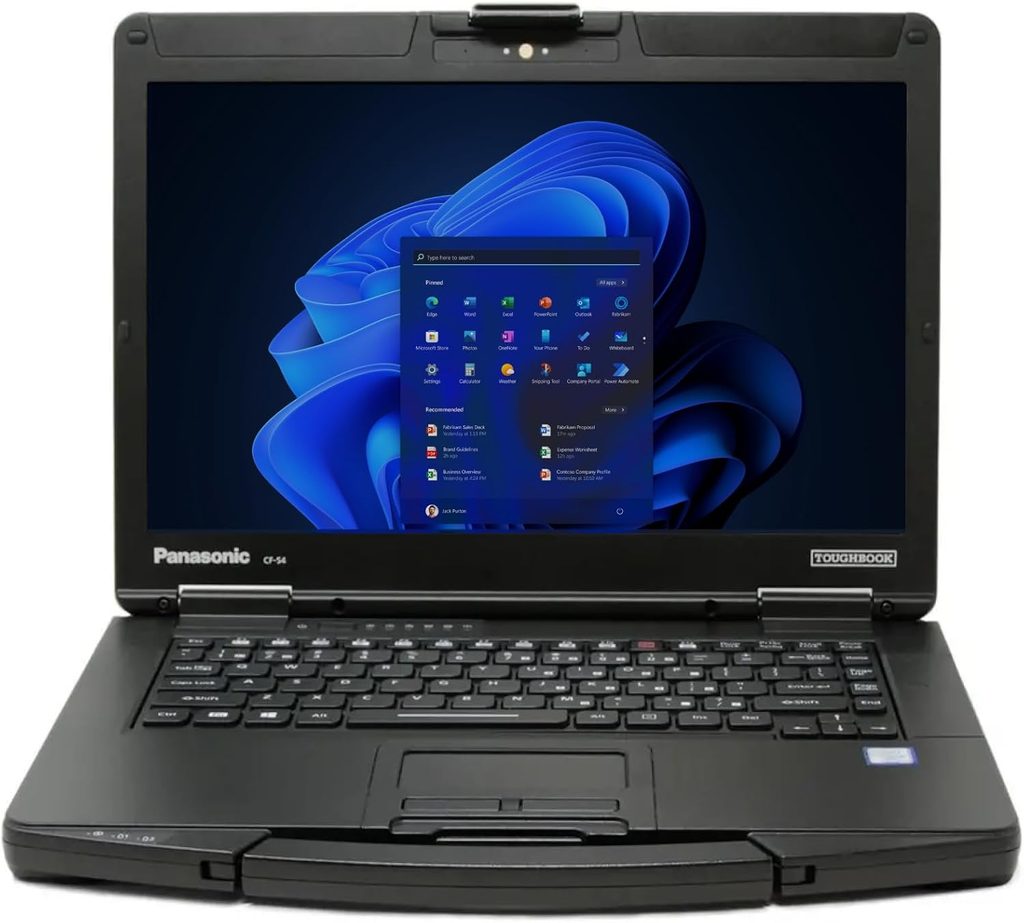
Ask a hundred fleet managers to name a waterproof laptop and most of them will say “Toughbook.” The Toughbook 40 is still the design everyone else gets measured against. In 2026 Panasonic released the Mk3, moved it to Intel Core Ultra Series 2 processors, and described it as the most rugged and modular Toughbook it has ever built. It shares its internal platform with the newer Toughbook 56.
My favorite thing about the Mk3 is that Panasonic left the chassis alone. Every dock, battery, and xPAK module from the Mk1 and Mk2 still fits. If your department already has forty vehicle docks bolted into cruisers, that compatibility alone can save thousands of dollars.
Key specs
- Processor: Intel Core Ultra 5 235H vPro or Core Ultra 7 265H vPro, with an Intel AI Boost NPU (rated 13 TOPS on its own)
- Graphics: Intel Arc integrated, with an optional AMD Radeon Pro W7500M 8GB
- Memory: 16GB DDR5, expandable to 64GB
- Storage: Quick-release 512GB NVMe OPAL SSD, configurable up to 2TB, plus an optional second SSD
- Display: 14″ 1920×1080, up to 1,200 nits, with capacitive touch that works with gloves and in rain
- Durability: IP66, MIL-STD-810H, MIL-STD-461G, 6-ft (180 cm) drop
- Operating temperature: -29 °C to 63 °C
- Battery: Up to 12 hours on one battery and up to 24 hours with the optional second battery (Panasonic’s claim), hot-swappable
- Modularity: Eight user-replaceable areas, including four xPAK expansion bays, which Panasonic says allow 9,600 configurations
- Weight: From 3.4 kg, or about 7.4 lb with the keyboard
- Price: New Mk3 configurations from about $5,419 at resellers
- Warranty: 36 months
What the labs found on this platform
Because the Mk3 is still new, the published measurements so far come from the Toughbook 40 platform it’s built on:
- RuggedPCReview (original Toughbook 40): The screen measured 1,235 nits, beating its own rating and setting the brightest result in that comparison. It scored 4,630 in PCMark 10 and lasted 5 hours 55 minutes in the PCMark 10 battery test on its 68 Wh battery.
- Notebookcheck (same model): It hit 1,841 in Cinebench R20 multi-core. CPU performance came in about 5–10% below the average laptop with the same chip, which is normal for rugged machines that are tuned for stability rather than raw speed.
- PCMag (Toughbook 40 Mk2): PCMag gave it an Editors’ Choice award among fully rugged laptops and praised its longer battery life and its remarkably bright display.
The Mk3’s Arrow Lake H-series chips come from the same family that pushed Getac’s B360 G3 to 7,436 in PCMark 10 at RuggedPCReview. That’s a big step up from the 4,630 the first Toughbook 40 scored.
Pros
- The most mature IP66 platform, with full backward compatibility for docks and xPAKs
- The only laptop here with an 8GB dedicated workstation GPU option
- A sunlight-readable touchscreen that works with gloves and rain, and that measured brighter than its spec on the original model
- Hot-swappable batteries, with up to 24 hours claimed
Cons
- Heavy and thick, at more than 2 inches closed
- The price climbs quickly once you add options
- It’s not rated for submersion, whatever its reputation suggests
Who should buy it: Police departments, utilities, and defense fleets that want the safest long-term choice, especially if they already own Panasonic accessories.
2. Dell Pro Rugged 13 Extreme: Best Compact Waterproof Laptop
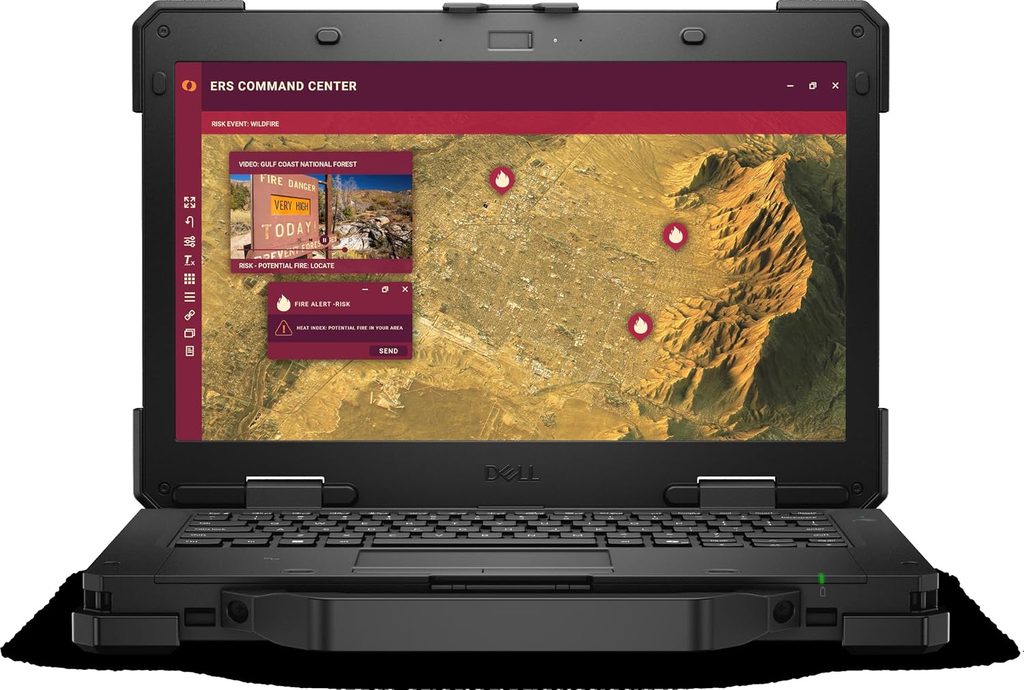
This is the newest laptop on the list. Dell introduced the Pro Rugged 13 Extreme in fall 2026 as the fully rugged sibling of the semi-rugged Pro Rugged 14, and it replaces the RA13250 Pro Rugged 13. The new name also marks the end of Dell’s long-running Latitude Rugged Extreme branding. Dell calls it the smallest and most powerful 13-inch fully rugged AI PC on the market, based on its own internal analysis.
What caught my attention is the weight. At 5.33 lb (2.41 kg), it’s about two pounds lighter than the Toughbook 40 and the Durabook Z14I. It still keeps the same IP66 rating and 6-foot drop rating, and it adds Class 1 Division 2 certification for hazardous locations. If you carry your laptop around all day instead of mounting it in a vehicle, you’ll notice those two pounds by mid-afternoon.
Key specs
- Processor: Intel Core Ultra 5 335 vPro (8 cores), Core Ultra 5 338H vPro (12 cores), or Core Ultra X7 368H vPro (16 cores, up to 5.0 GHz), with an NPU rated up to 50 TOPS
- Graphics: Integrated, up to Intel Arc B390
- Memory: 16, 32, or 64GB LPDDR5X (soldered)
- Storage: Removable SSD or self-encrypting drive, up to 2TB
- Display: 13.3″ FHD touchscreen, 1,400 nits, anti-glare, works with gloves and wet fingers
- Durability: IP66, MIL-STD-810H, MIL-STD-461G, HazLoc C1D2, 6-ft drop
- Operating temperature: -29 °C to 63 °C (-20 °F to 145 °F)
- Battery: One 53.5 Wh hot-swappable battery standard, expandable to two
- Connectivity: Wi-Fi 7, Bluetooth 6.0, optional 5G and dedicated GNSS, Thunderbolt 4/USB4, and a configurable I/O bay for USB-A, serial, Fischer, or 2.5GbE
- Thickness: 36.5 mm without bumpers, 43.5 mm with them
- Price: $5,256 on Dell.com
- Warranty: 3-year mail-in service, with optional ProSupport and Accidental Damage Service for 3–5 years
What the labs found on this platform
Here’s the most recent independent data from the same product line:
- LaptopMedia: The outgoing Pro Rugged 13 RA13250 with a Core Ultra 7 165H scored 926 in Cinebench 2024 multi-core. The new Core Ultra X7 368H is a newer generation with more cores, so it starts above that baseline.
- Battery: Dell rated the predecessor at up to 20 hours in MobileMark, but that figure used two batteries totaling 107 Wh. The 13 Extreme ships with one 53.5 Wh battery, so plan to add the second if you need a full shift.
- StorageReview tested the semi-rugged Pro Rugged 14 in the same family and was very impressed with its build quality and hot-swap battery design. That bodes well for Dell’s rugged engineering in general.
Pros
- The lightest IP66 laptop here at 5.33 lb
- A 1,400-nit display, tied for the brightest in this guide
- Hot-swappable dual-battery design and HazLoc C1D2 for refineries and chemical plants
- Wi-Fi 7, private 5G, and an optional dedicated GNSS module
Cons
- Only one battery in the box
- No discrete GPU option
- Soldered RAM, so buy enough memory up front
Who should buy it: Field engineers, firefighters, and utility crews who carry their laptop all day and want full IP66 protection without Toughbook weight.
3. Getac B360X: Best for the Newest Chips and the Brightest 14-Inch Screen
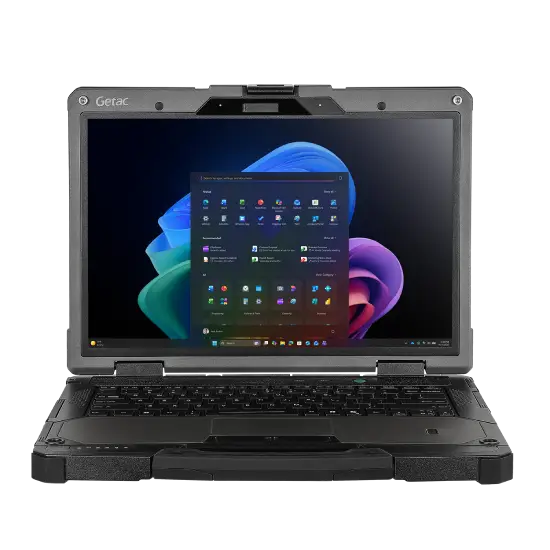
Getac announced the B360X and B360X Pro on October 23, 2026, with availability set for November 2026. They replace the B360 G3 and B360 Pro G3. The headline change is a 14-inch 1920×1200 LumiBond display at 1,400 nits in the same footprint as the old 13.3-inch model. The chips also move up to Intel Core Ultra Series 3, codenamed Panther Lake.
One clarification, though. Getac advertises up to 180 TOPS of AI performance. TechRadar pointed out that this is Intel’s “platform TOPS,” which adds together the NPU, graphics, and CPU, and that it applies only to the B360X with the Core Ultra X7 358H. The defense-focused B360X Pro tops out at the Core Ultra 7 356H and 366H. The 356H is rated at 98 TOPS, only slightly above the Core Ultra 7 255H in last year’s model.
Key specs
- Processor: Intel Core Ultra 5 336H, Core Ultra 7 356H/366H, or Core Ultra X7 358H (the X7 is available on the B360X only)
- Graphics: Intel Graphics, with an optional NVIDIA RTX PRO 500 Blackwell 6GB on the B360X Pro
- Storage: User-replaceable PCIe NVMe SSD, with an optional second SSD for up to 4TB in total
- Display: 14″ WUXGA (1920×1200) LumiBond, 1,400 nits, with capacitive touch that works with gloves and in rain
- Durability: IP66, MIL-STD-810H, MIL-STD-461G, 6-ft drop while operating, optional salt-fog certification
- Operating temperature: -29 °C to 63 °C on the B360 platform
- Weight: 2.38 kg (about 5.25 lb)
- Battery: Dual hot-swappable batteries standard on the Pro, plus a media bay that takes a third battery or a DVD drive
- Connectivity: Wi-Fi 7, Bluetooth 6, optional 4G LTE, 5G Sub-6/SA, L1/L5 GPS, and up to two Thunderbolt 4 ports
- Security: 5MP Windows Hello camera, TPM 2.0, smart card reader, Getac Disk Wipe
- Price: Sold through quotes. For reference, U.S. reseller SHI lists B360 G3 configurations at $5,405–$6,166 MSRP.
- Warranty: 3-year Bumper-to-Bumper, which includes accidental damage on Getac’s fully rugged devices
What the labs found on this platform
RuggedPCReview tested the B360 G3 with a Core Ultra 7 255H, and it was the fastest machine in their rugged comparison:
- PCMark 10: 7,436
- 3DMark Time Spy: 4,190
- Geekbench 5: 2,087 single-core, 11,859 multi-core, 39,950 OpenCL
- Display: 1,230 nits measured
- Battery: 10 hours 11 minutes in the PCMark 10 battery test on just 62.7 Wh, which made it the most efficient machine in the table
- Thermals: Exhaust air peaked just under 100 °F during 3DMark Fire Strike, down from 106 °F on the G2. RuggedPCReview also noted that Getac’s sealed fan design keeps working even when it’s soaked.
The B360X keeps the same chassis philosophy and moves to newer, more efficient silicon.
Pros
- A 1,400-nit 14-inch screen in a 13.3-inch footprint
- The newest processors on this list, with Copilot+ PC features
- Its platform led independent testing for both speed and efficiency
- Light for a fully rugged 14-inch laptop at 2.38 kg
- Accidental damage cover included in the standard warranty
Cons
- The 180 TOPS figure applies to only one processor on one model
- Getac’s spec sheets list memory simply as “DDR5,” so confirm the configuration you’re buying
- The port doors take a firm push to seal
Who should buy it: Teams refreshing a Getac fleet, and anyone who wants the newest Intel chips and the brightest 14-inch screen in a rugged laptop.
4. Durabook Z14I: Best Battery Life and the Only Fanless Pick
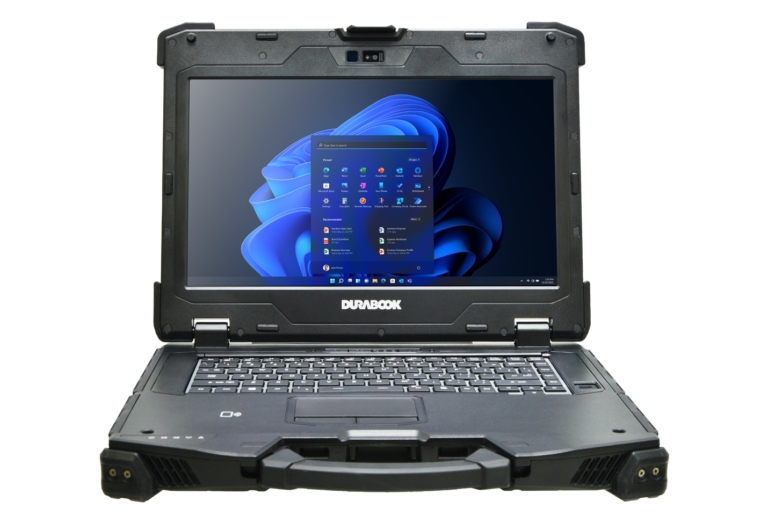
The Durabook Z14I is the quiet overachiever on this list, and I mean quiet literally, because it doesn’t have a fan. Durabook’s passive “Coolfinity” cooling means there’s no air intake to clog with dust and no fan to fail. In a dusty quarry or a tactical setting where noise matters, that’s a real advantage. The third-generation model also moved up from IP65 to IP66.
Durabook released two specialist spin-offs in 2026: the Z14I-HG with a 16GB RTX GPU and the triple-screen Z14I-DX3, which weighs 9.8 kg. The standard Z14I is still the general-purpose model.
Key specs
- Processor: Intel Core Ultra 5 125U/135U or Core Ultra 7 155U/165U (Series 1, 15/57 W)
- Graphics: Intel Graphics, with an optional NVIDIA RTX A500
- Memory: 16–64GB DDR5-5600 in two SODIMM slots, so you can upgrade it later
- Storage: Quick-release NVMe SSD up to 2TB, an optional second NVMe SSD up to 2TB, and an optional third SATA SSD
- Display: 14″ FHD DynaVue, rated at 1,200 nits, with glove, stylus, and water touch modes
- Durability: IP66, MIL-STD-810H (including salt fog, solar radiation, fungus, and explosive atmosphere), MIL-STD-461G, 6-ft drop, optional C1D2
- Operating temperature: -29 °C to 63 °C (-20 °F to 145 °F)
- Battery: 74.5 Wh main battery (12.5 hours claimed) plus an optional 50.8 Wh second battery (21.5 hours claimed in total), hot-swappable thanks to a bridge battery
- Ports: 2× Thunderbolt 4, 3× USB-A, 2× RJ45, 2× serial, VGA, HDMI, ExpressCard 54, and a smart card reader. If you rely on older equipment, this is the one to get.
- Weight: 7.94 lb (3.6 kg)
- Price: $3,599 starting MSRP
- Warranty: 3 years, with accidental damage included
What the labs measured (RuggedPCReview, Core Ultra 7 165U)
- PCMark 10: 5,603, about 20% faster than the previous Z14I
- 3DMark Time Spy: 2,026
- Geekbench 5: 1,627 single-core, 6,644 multi-core, 14,405 OpenCL
- Battery: 10 hours 4 minutes in the PCMark 10 battery test on the standard battery alone. Power draw ranged from 4.6 W at idle, which works out to a theoretical 16.2 hours, up to 13.1 W at maximum performance and brightness, or about 5.7 hours.
- Display: The review text reports a peak of 1,150 nits, while its comparison table lists 925 nits. Expect real-world brightness somewhere in that range, which is a bit below the 1,200-nit rating.
- Thermals: Despite having no fan and a chip that turbos to 57 W, the reviewers said it stayed remarkably cool through every benchmark, and cooler than the previous generation.
- Weight as tested: 8.11 lb
Pros
- Fanless, so nothing pulls in dust or water and it runs silently
- Excellent measured battery life, with a second battery available for about 21.5 hours
- Upgradeable RAM and room for up to three drives
- The best warranty value here, with 3 years of accidental damage cover included
- The lowest starting price of the four laptops
Cons
- Older Core Ultra Series 1 chips, so sustained performance trails fan-cooled rivals
- Heavy at nearly 8 lb
- Measured brightness came in below the 1,200-nit rating
- You have to remove the keyboard to get to the RAM
Who should buy it: Mining, military, and maritime teams working in dusty or sandy conditions, crews where noise matters, and anyone who wants the most warranty for the money.
5. Samsung Galaxy Tab Active5 Pro + Rugged Slim Keyboard: The Only Truly Submersible Pick
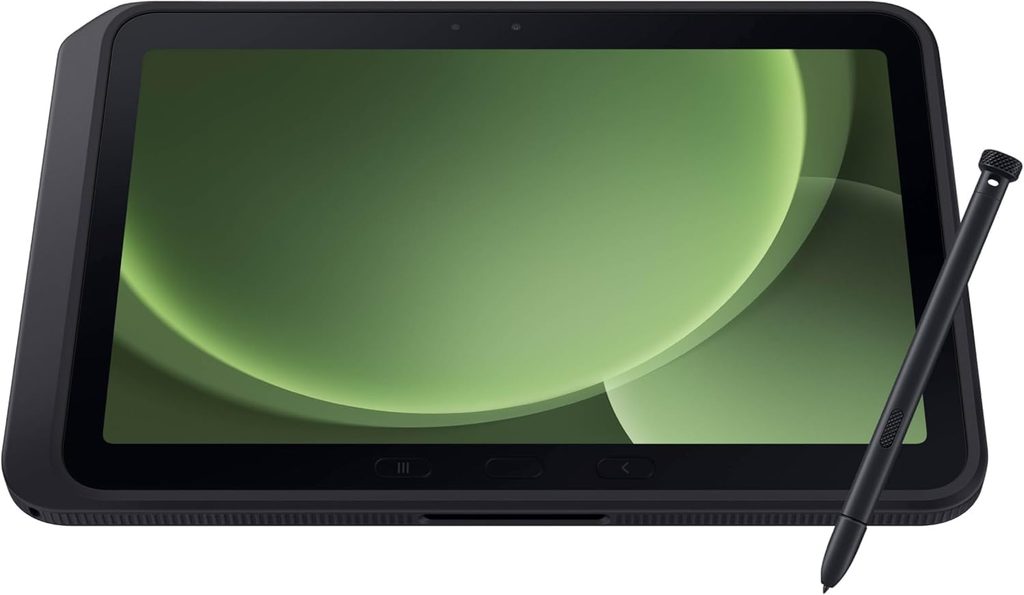
This is my contrarian pick, and it covers something the other roundups don’t. If what worries you is the laptop falling into the water, rather than taking a hit, no IP66 laptop is certified to survive that. The Galaxy Tab Active5 Pro is. Samsung rates it IP68 for 1.5 meters of fresh water for 30 minutes, and it’s MIL-STD-810H tested. It also costs roughly a seventh as much as the laptops above.
It runs Android with Samsung DeX rather than Windows. With Samsung’s Rugged Slim Keyboard attached ($155 on Samsung’s government price list), it becomes a capable laptop replacement for forms, email, inspections, and web apps. I also checked whether a newer model is out. The Galaxy Tab Active6 has so far shown up only in certification database leaks, so the Active5 Pro is still Samsung’s current rugged flagship.
Key specs
- Chip: Qualcomm Snapdragon 7s Gen 3 (4 nm)
- Memory/storage: 6GB/128GB or 8GB/256GB, plus microSD
- Display: 10.1″ WUXGA (1920×1200) TFT, 120 Hz, works with gloves and on a wet screen, Gorilla Glass Victus+
- Durability: IP68 (1.5 m for 30 minutes in fresh water), MIL-STD-810H, 1.2 m drop bare and 1.5 m in the included cover
- Battery: Two cells totaling 10,100 mAh, plus a no-battery mode for running from vehicle power
- Extras: IP68 S Pen in the box, programmable Active Key, Knox Vault, and 8 years of updates
- Weight: 683 g (1.51 lb) for the 5G model, without the keyboard
- Price: $659 (6/128 Wi-Fi) to $839 (8/256 unlocked 5G) MSRP, plus $155 for the keyboard
What the labs measured (Notebookcheck)
- Display: 768 nits peak, 729.7 nits average, 1,611:1 contrast, and no PWM flicker detected
- Battery: 22 hours 36 minutes of Wi-Fi web browsing and 26 hours 27 minutes of 1080p video playback, compared with 14.2 hours for the Tab Active4 Pro
- Geekbench 6: 1,158 single-core, 3,322 multi-core
- 3DMark: Wild Life Extreme 1,093 and Wild Life Unlimited 4,180, with 99.8% stress-test stability and no signs of thermal throttling
- Overall rating: 80%, “good”
Pros
- The only device in this guide certified for full submersion
- Outstanding measured battery life
- About $814–$994 with the keyboard, a fraction of the others’ cost
- Light, with 8 years of software support
Cons
- Android and DeX rather than Windows, so check that your work apps run on it
- The batteries aren’t hot-swappable, and the tablet needs both cells installed to run on battery
- Slow charging, at up to 3.5 hours with a 15 W cap
- At 768 nits, it’s dimmer than the 1,200–1,400-nit laptops
- The keyboard isn’t IP68; only the tablet is
Who should buy it: Marine and dock crews, river surveyors, farmers, and anyone on a budget whose real risk is submersion rather than impact.
Warranty and Accidental Damage Coverage Compared
The fine print here can be worth thousands of dollars, and most reviews don’t mention it.
| Model | Standard warranty | Accidental damage included? |
|---|---|---|
| Panasonic Toughbook 40 Mk3 | 3 years (36 months) | Not standard; available through Panasonic’s add-on protection plans |
| Dell Pro Rugged 13 Extreme | 3 years mail-in after remote diagnosis | Optional, as 3–5 year Accidental Damage Service |
| Getac B360X | 3-year Bumper-to-Bumper | Yes, included as standard on Getac’s fully rugged devices |
| Durabook Z14I | 3 years | Yes, 3-year accidental damage warranty included |
| Samsung Galaxy Tab Active5 Pro | Varies by region | Not standard |
My take: if you’re buying a single machine for yourself, the included accidental damage cover from Durabook and Getac changes the real cost math. Over three years, the Durabook’s $3,599 starting price works out to about $1,200 a year with drop and spill coverage already included. If you’re buying for a fleet, negotiate accidental damage into the contract with every vendor.
My Water Survival Routine (Things the Spec Sheet Won’t Tell You)
An IP rating is only as good as how you treat the laptop afterward. These are the habits I recommend to anyone who works with rugged gear around water:
- Check the port doors before you go out. It takes five seconds. Press each door and listen for the latch. An open door cancels the IP rating completely.
- Don’t open the doors while the laptop is wet. Wipe and dry the area around a port before you open it, or water that’s sitting on the outside runs straight in.
- Rinse off saltwater with fresh water the same day. Salt crystals damage seals and contacts over time, even on salt-fog-tested machines.
- Look at the gaskets once a month. Cracked or flattened seals mean the IP rating no longer applies. Replacement doors and gaskets are cheap compared with a new motherboard.
- Never charge it while the charging port is wet. Dry the port completely first.
Buying Guide: How to Choose a Waterproof Laptop
- Start with the worst water you’re realistically likely to face. For rain and spills, IP53 is enough. For hose-downs and wind-driven rain, you need IP66. If the laptop could actually end up underwater, you need IP67 or IP68, which today means a rugged tablet.
- Know fully rugged from semi-rugged. Fully rugged means 6-ft drops and IP65 or IP66. Semi-rugged usually means 3–4 ft drops and IP53. The semi-rugged Dell Pro Rugged 14 is a great machine, but it isn’t a waterproof laptop.
- Brightness matters outside. In direct sun you want 1,000 nits or more. Look for measured figures, not just claims. The Durabook measured below its rating, while the original Toughbook 40 measured above its own.
- Decide on a fan or no fan. Sealed fans work well, but a fanless design removes a failure point entirely.
- Prioritize battery swapping over raw capacity. Hot-swapping beats a bigger single battery. Budget for the second battery, especially on the Dell.
- Check what ports you need. If you need serial ports, VGA, or ExpressCard, look at the Durabook or a Toughbook with an xPAK.
- Weigh portability against mounting. If the laptop lives in a vehicle dock, 8 lb is fine. If you carry it, look at the Dell (5.33 lb) or the Getac (2.38 kg).
- Ask for the list of MIL-STD test methods. “MIL-STD-810H” on its own doesn’t tell you anything.
My Pre-Purchase Checklist
- The second IP digit matches my real water risk
- The port doors are easy to close and latch with gloves on
- Measured brightness is at least 1,000 nits
- A second battery is included in the budget
- Accidental damage coverage is confirmed in writing
- Docks and accessories work with my existing fleet
- My work software runs on the chosen processor and operating system
- Salt-fog testing is included if I work near the ocean
Frequently Asked Questions
Is there a fully waterproof laptop you can submerge?
Not among current mainstream laptops. Fully rugged laptops top out at IP66, which covers powerful water jets but not immersion. If you need certified submersion, the Samsung Galaxy Tab Active5 Pro (IP68, 1.5 m for 30 minutes) with a keyboard is the practical choice.
What’s the difference between IP65 and IP66?
Both are fully dust-tight. In the IP65 test, water comes through a 6.3 mm nozzle at 12.5 liters per minute. The IP66 test uses a 12.5 mm nozzle at 100 liters per minute, eight times the flow, sprayed from 2.5–3 m for at least 3 minutes. Neither one covers immersion.
Is IP53 waterproof?
No. IP53 means the laptop is dust-protected and resists spray up to 60° from vertical. That’s fine for rain and spills, but not for jets or immersion.
Does MIL-STD-810H mean a laptop is waterproof?
Not by itself. MIL-STD-810H is a collection of test methods, and water resistance depends on which ones, if any, were run. For water, rely on the IP rating.
What is the best waterproof laptop in 2026?
For most fleets, the Panasonic Toughbook 40 Mk3. If weight matters most, the Dell Pro Rugged 13 Extreme. For battery life, fanless reliability, and warranty value, the Durabook Z14I.
How much does a waterproof laptop cost?
IP66 fully rugged laptops start around $3,600 (the Durabook Z14I’s MSRP) and typically run $5,000–$6,000. The IP68 Samsung tablet with a keyboard costs about $814–$994.
Can I use a waterproof laptop in saltwater?
IP ratings are tested with fresh water. Look for MIL-STD-810H salt-fog testing, which the Durabook Z14I has and the Getac B360X offers as an option, and rinse the laptop with fresh water after any exposure.
Do waterproof laptops overheat because they’re sealed?
Not necessarily. RuggedPCReview found that the fanless Durabook Z14I stayed remarkably cool through its benchmarks, and the exhaust on the fan-cooled Getac B360 G3 peaked just under 100 °F under heavy load.
Final Verdict
If I had to send a single laptop into rain, mud, and a pressure-washer rinse every day for the next five years, I’d pick the Panasonic Toughbook 40 Mk3. Its accessory ecosystem, IP66 protection, and modular design make it the safest long-term choice. If I were carrying it on my shoulder all day, I’d switch to the Dell Pro Rugged 13 Extreme without hesitation. If I wanted the most value and the best warranty for my money, I’d go with the Durabook Z14I. And if my real fear were the laptop falling into the water, I’d skip laptops altogether and buy the Galaxy Tab Active5 Pro.
Whichever one you choose, remember that a rugged laptop is only as waterproof as its port doors are closed.
Sources
- RuggedPCReview: Panasonic Toughbook 40 review
- RuggedPCReview: Getac B360 G3 review
- RuggedPCReview: Durabook Z14I (2025) review
- Notebookcheck: Panasonic Toughbook 40 laptop review
- Notebookcheck: Samsung Galaxy Tab Active5 Pro review
- Notebookcheck: Dell unveils Pro Rugged 13 Extreme
- Notebookcheck: Panasonic Toughbook 40 Mk2 reviews
- Tom’s Guide: Panasonic Toughbook 40 review
- Panasonic: Toughbook 40 product page
- Enterprise Times: Panasonic launches Toughbook 40 Mk3
- RuggedBooks: Panasonic Toughbook 40 Mk3 review
- Tough Outlet: Panasonic Toughbook 40 pricing
- Dell: Pro Rugged 13 Extreme (PR713260)
- Dell Newsroom: New rugged laptops announcement
- StorageReview: Dell Pro Rugged 13 Extreme and Pro Rugged 14
- Dell: Pro Rugged 13 RA13250 spec sheet
- LaptopMedia: Dell Pro Rugged 13 RA13250 series
- Getac: B360X product page
- Getac: B360X Pro product page
- PR Newswire: Getac B360X and B360X Pro launch
- TechRadar: Getac’s new rugged notebooks
- SHI: Getac B360 G3 pricing
- Durabook: Z14I fully rugged laptop
- TechRadar: Durabook Z14I-DX3 launch
- Samsung: Galaxy Tab Active5 Pro
- Samsung: Government tablet MSRP price file
- TechRadar: Samsung’s new rugged tablet
- Android Headlines: Galaxy Tab Active6 GSMA leak
- ToughRuggedLaptops: The real guide to waterproof laptops

Hi, my name is Burak. I am a mechanical engineer. I have been writing laptop reviews for the Engineering Laptops website since 2020. Please feel free to contact me if you have any questions.