Estimated reading time: 7 minutes
Key Takeaways
- The Razer Blade 16 combines premium build quality with powerful gaming performance, making it ideal for gamers and professionals alike.
- It features a 16-inch OLED display with a 240Hz refresh rate, delivering stunning visuals for gaming and content creation.
- Performance-wise, it offers top-tier Intel HX or AMD Ryzen chips and NVIDIA RTX GPUs, ensuring it handles demanding tasks smoothly.
- The battery life is decent for light usage but not ideal for gaming; expect average longevity under heavy load.
- While it comes at a premium price, the Razer Blade 16 Laptop Review emphasizes its balance between performance and portability.
Table of contents
- Quick Overview
- Design & Build Quality: Premium From Every Angle
- Display: One of the Best You Can Get on a Laptop
- Performance: Desktop-Level Power in a Travel-Friendly Machine
- Cooling & Noise: The Trade-Off of Thin Power
- Keyboard, Trackpad & Everyday Use
- Ports & Connectivity
- Battery Life: Good, Not Game-Changing
- Who Is the Razer Blade 16 For?
- Pros and Cons
- Final Verdict: Is the Razer Blade 16 Worth It?
- How to Decide if the Razer Blade 16 Is Right for You
- FAQs
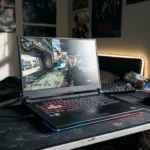
If you’ve ever wished for a laptop that feels like a MacBook in build quality but performs like a full-blown gaming desktop, the Razer Blade 16 is probably already on your radar. In this Razer Blade 16 Laptop Review, we’ll take a closer look at what sets it apart.
This machine isn’t just about raw specs. It’s about balance. Power and portability. Gaming and professional work. Clean design and serious performance. After spending real time digging into what this laptop offers, here’s the honest breakdown — no hype, just the facts and real-world perspective.
Purchase on Amazon or check availabilityQuick Overview
| Feature | What You’re Getting |
|---|---|
| Display | 16-inch OLED, up to 240Hz |
| CPU Options | Latest high-performance Intel HX or AMD Ryzen AI chips |
| GPU Options | NVIDIA RTX 4080 / 4090 / newer 50-series configurations |
| RAM | Up to 64GB |
| Storage | Up to 4TB SSD |
| Build | CNC aluminum unibody |
| Weight | Around 4.5 lbs (approx.) |
| Target Users | Gamers, creators, engineers, power users |
Design & Build Quality: Premium From Every Angle
The Blade 16 looks and feels expensive — because it is. But unlike many gaming laptops that scream RGB overload, this one keeps things minimal and clean.
The CNC-milled aluminum chassis feels solid. No flex. No cheap plastic vibes. It’s slim for what it packs inside, which makes it surprisingly portable for a high-performance 16-inch laptop.
It’s the kind of laptop you can confidently open in a business meeting — and later use to run Cyberpunk at ultra settings.
Minor downside? Fingerprints. The matte black finish loves them.
Display: One of the Best You Can Get on a Laptop
The 16-inch OLED panel is easily one of the Blade 16’s strongest features.
Deep blacks. Rich colors. Smooth 240Hz refresh rate. Whether you’re gaming, editing videos, or just watching Netflix, everything looks sharp and alive.
Why the OLED 240Hz combo matters:
- Competitive gaming feels incredibly smooth
- Content creation benefits from strong contrast and color depth
- HDR content looks genuinely impressive
- Motion clarity is excellent
If display quality is high on your priority list, this laptop absolutely delivers.
Performance: Desktop-Level Power in a Travel-Friendly Machine
Let’s talk power.
Depending on configuration, the Blade 16 can be equipped with high-end HX processors and NVIDIA RTX GPUs. That means:
- AAA games at ultra settings? No problem.
- 4K video editing? Smooth timeline playback.
- 3D rendering or Blender projects? Strong performance.
- Engineering software and simulations? Handles heavy workloads confidently.
This isn’t a “thin but weak” laptop. It’s thin and powerful.
Real-World Performance Expectations
| Task | Experience |
|---|---|
| Competitive Gaming | Extremely smooth |
| AAA Gaming | High to Ultra settings |
| Video Editing | Fast renders with GPU acceleration |
| 3D Modeling | Reliable under heavy loads |
| Multitasking | Effortless with 32GB+ RAM |
It’s built for people who push their machines.
Cooling & Noise: The Trade-Off of Thin Power
Packing this much performance into a slim body comes with reality: heat.
Under light use, it’s quiet. Browsing, writing, streaming — no issue.
Under heavy gaming or rendering, the fans spin up. It’s not unbearable, but you’ll hear it. That’s expected in this category.
Using a cooling pad or elevated stand helps. For long rendering sessions, that’s a smart move anyway.
Keyboard, Trackpad & Everyday Use
- The keyboard feels responsive and comfortable for long typing sessions.
- Per-key RGB is customizable but can be subtle if you prefer a professional look.
- The trackpad is large and smooth — one of the better Windows laptop trackpads out there.
For productivity work, it feels refined. Not “just a gaming laptop.”
Ports & Connectivity
You get a practical mix of ports:
- USB-C with Thunderbolt support
- USB-A ports
- HDMI
- SD card reader (depending on model)
- Fast Wi-Fi and Bluetooth
That means no constant dongle drama.
Battery Life: Good, Not Game-Changing
This isn’t an ultrabook. It’s a performance machine.
For browsing, office tasks, and light work, you can expect several hours unplugged. But gaming on battery? Not realistic.
If battery life is your top priority, this may not be your best option. If performance is, you’ll accept the trade-off.
Who Is the Razer Blade 16 For?
This laptop makes sense if you are:
- A gamer who also needs a professional-looking machine
- A content creator editing video or working in 3D
- An engineering student running simulation software
- A professional who wants one device for everything
It may not be ideal if:
- You’re on a tight budget
- You need ultra-quiet operation under load
- You prioritize all-day battery life over performance
Pros and Cons
Pros
- Stunning OLED 240Hz display
- Extremely powerful hardware options
- Premium, solid aluminum build
- Portable for its performance level
- Strong balance between gaming and productivity
Cons
- Premium price
- Fans get loud under heavy load
- Battery life is average
- Gets warm during long intensive sessions
Final Verdict: Is the Razer Blade 16 Worth It?
The Razer Blade 16 isn’t cheap — and it’s not trying to be.
What you’re paying for is a rare combination:
Slim design.
Top-tier performance.
One of the best laptop displays available.
It’s the kind of machine you buy because you want fewer compromises. One device that can handle gaming at night and professional workloads during the day.
If you want maximum power in a refined, portable body — and you’re okay with paying for premium engineering — this laptop absolutely deserves a spot on your shortlist.
How to Decide if the Razer Blade 16 Is Right for You
Time needed: 5 minutes
Thinking about buying the Razer Blade 16 but not sure if it’s the right fit? Follow these three simple steps to figure out whether this premium performance laptop matches your needs, budget, and daily workflow.
- Identify Your Main Use Case
Start by being honest about what you’ll actually use the laptop for. Are you gaming at high settings? Editing 4K videos? Running 3D rendering or engineering software? The Blade 16 is built for demanding tasks, so it makes the most sense if you truly need that level of performance.
- Choose the Right Hardware Configuration
Not every Blade 16 configuration is the same. Decide how much GPU power, RAM, and storage you really need. Gamers and creators may want RTX 4080 or higher with 32GB+ RAM, while lighter users can save money with a more balanced setup.
- Balance Performance with Budget and Portability
The Blade 16 delivers serious power in a slim design — but it comes at a premium price. Make sure you’re comfortable with the investment and understand the trade-offs like average battery life and fan noise under heavy load.
FAQs
Yes, that’s actually where it shines. It’s powerful enough to handle demanding AAA games, but it also feels perfectly at home running video editing software, 3D tools, or heavy multitasking. It’s a true all-in-one machine.
Under heavy gaming or rendering, the fans do kick in — that’s normal for a slim, high-performance laptop. It’s not unusually loud for its class, but you’ll definitely hear it when you’re pushing it hard.
If you care about premium build quality, top-tier performance, and one of the best laptop displays available, it’s worth it. If budget is your main concern, there are more affordable options — but they won’t feel this refined.

Hi, my name is Burak. I am a mechanical engineer. I have been writing laptop reviews for the Engineering Laptops website since 2020. Please feel free to contact me if you have any questions.