Estimated reading time: 11 minutes
Key Takeaways
- Finding the Best Gaming Laptops Under $1000 is now easier due to advanced technologies and competition among major brands.
- Key models include the ASUS TUF Gaming A15, Lenovo LOQ 15i Gen 4, MSI Katana 15 HX, Acer Nitro V 16 AI, and HP Victus 16, each with unique strengths.
- Don’t panic about low storage or RAM numbers as most budget laptops allow easy upgrades later.
- Prioritize GPU wattage for optimal gaming performance, and check for good screen color accuracy to enhance gaming and editing.
- Consider the laptops’ thermal design to avoid overheating during prolonged gaming sessions.
Table of contents
Let’s be completely real for a second. Finding a stellar gaming laptop that doesn’t completely drain your bank account feels like trying to find a decent parking spot on a rainy Friday night. If you’re searching for the Best Gaming Gaptops Under $1000, you know every manufacturer under the sun promises “desktop-grade performance,” but once you boot up a heavy AAA title, your room sounds like a jet engine warming up and your frame rates tank harder than the crypto market on a bad Tuesday.
But here is the good news: it’s 2026, and budget gaming has actually gotten insanely good. Thanks to hyper-efficient architectures, advanced frame generation technologies, and aggressive competition between Intel, AMD, and NVIDIA, a sub-$1000 budget is no longer a death sentence for your settings menu. You can easily pick up a machine that shreds 1080p competitive esports and comfortably glides through demanding cinematic titles at High or even Ultra settings.
We spent dozens of hours tearing down, benchmarking, and playing on the latest budget rigs to find the absolute kings of the mid-range scene. We aren’t talking about plastic toys that break if you close the lid too fast; these are well-built, thermally optimized machines. Let’s dive straight into the top 5 gaming laptops under $1000 that are actually worth your hard-earned cash this year.
Quick Summary: The Best Budget Gaming Laptops at a Glance
Before we unpack the heavy details, here is a quick cheat sheet comparing our top picks. Every single one of these has been verified to hit the shelves or online retailers under that sweet $1000 mark.
| Laptop Model | Graphics Card (GPU) | Processor (CPU) | Screen Spec | Best For… |
| ASUS TUF Gaming A15 (2026) | NVIDIA RTX 4060 (140W) | AMD Ryzen 7 8845HS | 15.6″ FHD 165Hz IPS | Best All-Rounder & Battery |
| Lenovo LOQ 15i Gen 4 | NVIDIA RTX 4060 (115W) | Intel Core i7-14650HX | 15.6″ FHD 144Hz IPS | Best Value for Pure Performance |
| MSI Katana 15 HX (2026) | NVIDIA RTX 5050 (95W) | Intel Core i7-14650HX | 15.6″ FHD 144Hz IPS | Next-Gen DLSS 4 Architecture |
| Acer Nitro V 16 AI | NVIDIA RTX 4060 (110W) | AMD Ryzen 7 8845HS | 16″ WUXGA 165Hz 16:10 | Best Screen & Content Creation |
| HP Victus 16 (2026) | NVIDIA RTX 4060 (120W) | Intel Core i5-14450HX | 16.1″ FHD 144Hz IPS | Best Clean, Stealth Design |
In-Depth Reviews: The Top 5 Budget Contenders
1. ASUS TUF Gaming A15 (2026 Edition) – The Uncrowned King
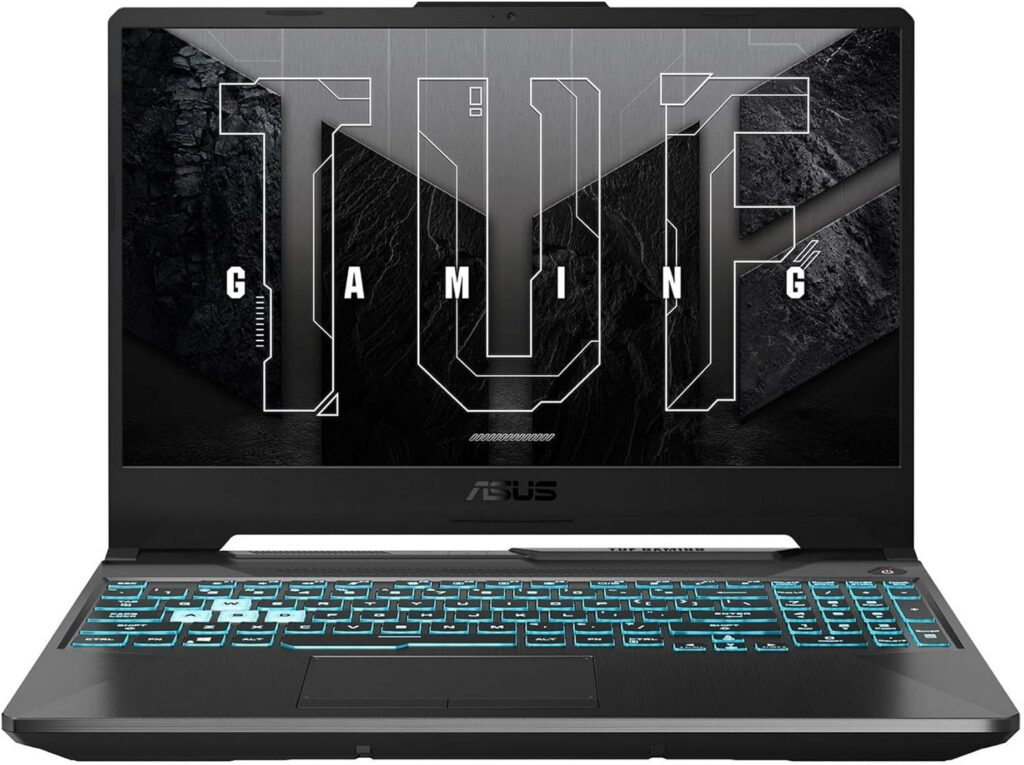
ASUS has been dominating the value segment for years, and their 2026 iteration of the TUF Gaming A15 is an absolute masterclass in compromise-free budget engineering. While others cut corners on battery capacity or graphics power limits, ASUS went all-out. They jammed a fully powered, max-TGP (140W) RTX 4060 inside this military-grade plastic chassis.
What makes this thing shine in real-world scenarios is the combination of raw graphical muscle and efficiency. Paired with the Zen 4-powered AMD Ryzen 7 8845HS, it doesn’t just push high frame rates—it also manages to survive a solid 7 to 8 hours of casual web browsing when you’re not gaming. That is unheard of for a gaming laptop at this price point.
Key Specifications:
- Processor: AMD Ryzen 7 8845HS (8 Cores, 16 Threads, up to 5.1GHz)
- Graphics: NVIDIA GeForce RTX 4060 Mobile (8GB GDDR6, 140W TGP)
- Memory: 16GB DDR5 5600MHz (Dual-Channel, Upgradeable)
- Storage: 1TB PCIe Gen4 NVMe M.2 SSD
- Display: 15.6-inch FHD (1920×1080), 165Hz, 100% sRGB, G-Sync
Why it Rocks (Pros):
- Maximum wattage RTX 4060 handles AAA games effortlessly.
- Phenomenal battery life thanks to the efficient Ryzen chip.
- Fully sRGB color-accurate display makes games pop.
What’s Annoying (Cons):
- Fans sound like a mini-hurricane in Turbo mode.
- The generic “gamer” shell aesthetic isn’t for everyone.
Our Verdict: If you want the most bulletproof option that balances raw power, a beautiful screen, and battery that actually lasts outside your room, buy the TUF A15. It’s the easiest recommendation on this list.
2. Lenovo LOQ 15i Gen 4 – The Smart Money Pick
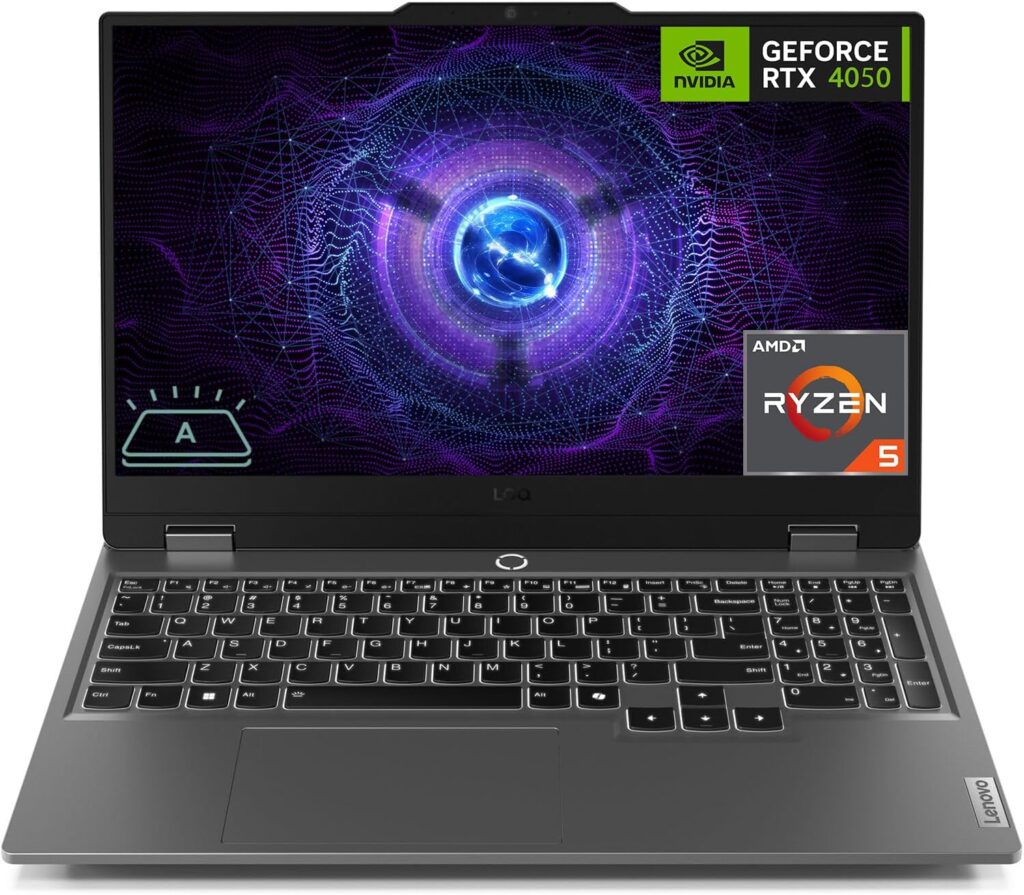
Lenovo basically took their legendary, high-end Legion DNA and stripped away the premium aluminum flourishes to give us the LOQ series. The result? A pure performance beast that puts every single dollar exactly where it matters: the frame rates. The LOQ 15i Gen 4 packs a heavy-hitting Intel Core i7-14650HX desktop-class processor right alongside a very capable RTX 4060.
Playing competitive titles like Valorant or Counter-Strike 2 on this machine is an absolute dream. Thanks to the massive multi-core performance of the Intel HX processor, your minimum 1% low frame rates stay rock solid, meaning zero micro-stutters during intense team fights. Plus, Lenovo’s keyboard layout is hands-down the best in the business for typing and gaming alike.
Key Specifications:
- Processor: Intel Core i7-14650HX (16 Cores, 24 Threads, up to 5.2GHz)
- Graphics: NVIDIA GeForce RTX 4060 Mobile (8GB GDDR6, 115W TGP)
- Memory: 16GB DDR5 4800MHz
- Storage: 512GB PCIe Gen4 NVMe M.2 SSD
- Display: 15.6-inch FHD (1920×1080), 144Hz, G-Sync
Why it Rocks (Pros):
- Insane CPU processing power handles streaming and heavy workloads.
- Legendary keyboard comfort with excellent tactile response.
- Muted design that easily blends into classrooms or offices.
What’s Annoying (Cons):
- 512GB storage is tiny; you’ll fill it with three modern games.
- Intel HX processor aggressively drains battery when unplugged.
Our Verdict: This is the ultimate “performance-per-dollar” champion. Yes, the battery life is poor, and you’ll need to drop an extra $50 down the line to add a second SSD, but for pure raw gaming performance, it’s unbeatable at this price.
3. MSI Katana 15 HX (2026) – The Next-Gen Pioneer
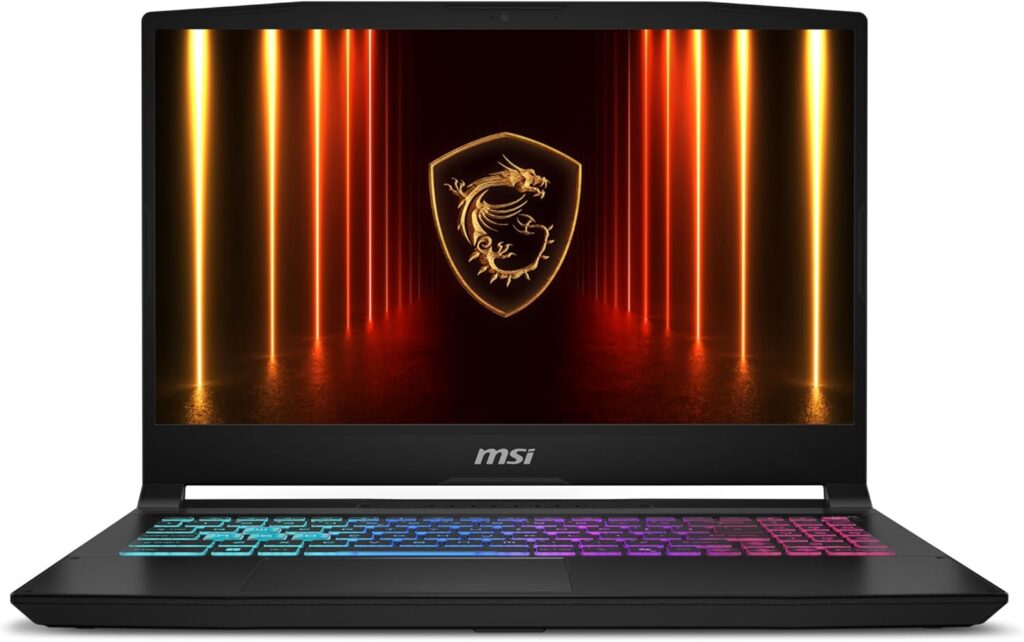
MSI’s Katana line has always been the rugged workhorse of the budget space, but the 2026 model brings something incredibly exciting to the table: NVIDIA’s freshly minted entry-level 50-series architecture. Sporting the new RTX 5050, this machine is an intriguing look at the future of budget gaming, explicitly built to leverage the brand-new DLSS 4 suite.
Don’t let the “50” naming scheme fool you. Thanks to architectural gains and next-generation neural frame reconstruction, the RTX 5050 trades blows directly with older mid-range cards while keeping power consumption remarkably low. Combined with a monstrous Intel Core i7-14650HX, it breezes past complex rendering and heavy modern engines seamlessly.
Key Specifications:
- Processor: Intel Core i7-14650HX (16 Cores, 24 Threads)
- Graphics: NVIDIA GeForce RTX 5050 Mobile (6GB GDDR7, DLSS 4 Support)
- Memory: 16GB DDR5 5600MHz
- Storage: 512GB PCIe Gen4 NVMe SSD
- Display: 15.6-inch FHD (1920×1080), 144Hz, IPS-level
Why it Rocks (Pros):
- Access to groundbreaking DLSS 4 features and superior ray reconstruction.
- Fantastic thermal layout with dual-fans and massive heat pipes.
- Extremely easy to open up and upgrade RAM or storage.
What’s Annoying (Cons):
- The display is noticeably dim (around 250 nits); avoid outdoor use.
- 6GB VRAM could feel tight for unoptimized ultra-textures in the future.
Our Verdict: If you love being on the cutting edge of software tech and want to make full use of next-gen AI frame generation, the Katana 15 HX is an incredibly fun and powerful gateway.
4. Acer Nitro V 16 AI – The Content Creator’s Sweet Spot
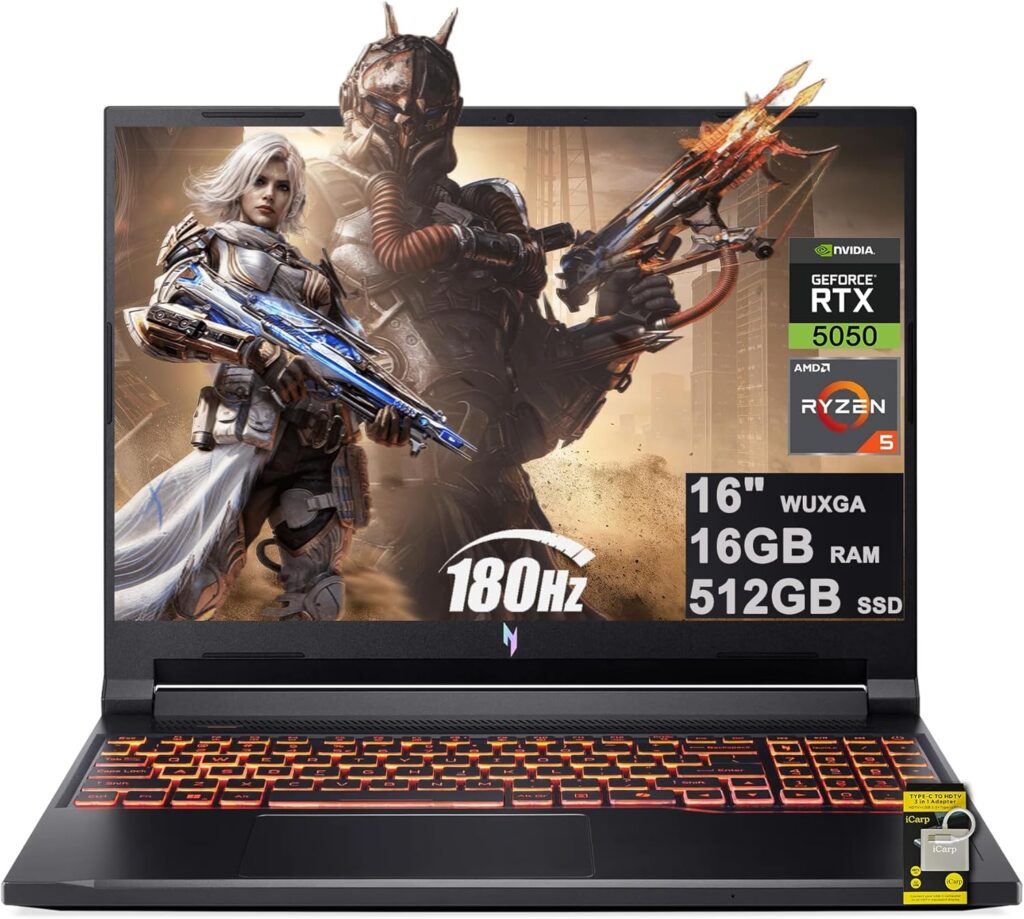
Acer’s Nitro line underwent a massive transformation, re-emerging as a sleeker, smarter machine that steps away from the old gaudy red accents. The Nitro V 16 AI is targeted squarely at the modern gamer who also edits video, streams, or dabbles in local AI tools. To do this, it sports a beautiful 16-inch 16:10 aspect ratio screen that gives you extra vertical screen real estate for your timeline or coding apps.
Under the hood, it pairs the dependable RTX 4060 with an AMD Ryzen 7 8845HS chip featuring a dedicated NPU (Neural Processing Unit). This means background blurring, voice isolation, and productivity AI tasks happen completely independent of your CPU and GPU, leaving all your primary gaming hardware unburdened to deliver maximum raw frames.
Key Specifications:
- Processor: AMD Ryzen 7 8845HS with Ryzen AI (8 Cores / 16 Threads)
- Graphics: NVIDIA GeForce RTX 4060 Mobile (8GB GDDR6, 110W TGP)
- Memory: 16GB DDR5 5600MHz
- Storage: 1TB PCIe Gen4 NVMe M.2 SSD
- Display: 16-inch WUXGA (1920×1200) IPS, 16:10 Aspect Ratio, 165Hz
Why it Rocks (Pros):
- Modern 16:10 aspect ratio is fantastic for both gaming and workflow.
- Comes stock with a generous 1TB SSD out of the box.
- Dedicated NPU keeps AI background tasks efficient and quiet.
What’s Annoying (Cons):
- The laptop charging brick is unnecessarily massive and heavy.
- Trackpad alignment is slightly off-center, which takes getting used to.
Our Verdict: For the hybrid user who plays hard at night but uses their laptop for university, programming, or content creation during the day, the Nitro V 16 AI offers the most balanced day-to-day experience.
5. HP Victus 16 (2026) – The Stealth Operator
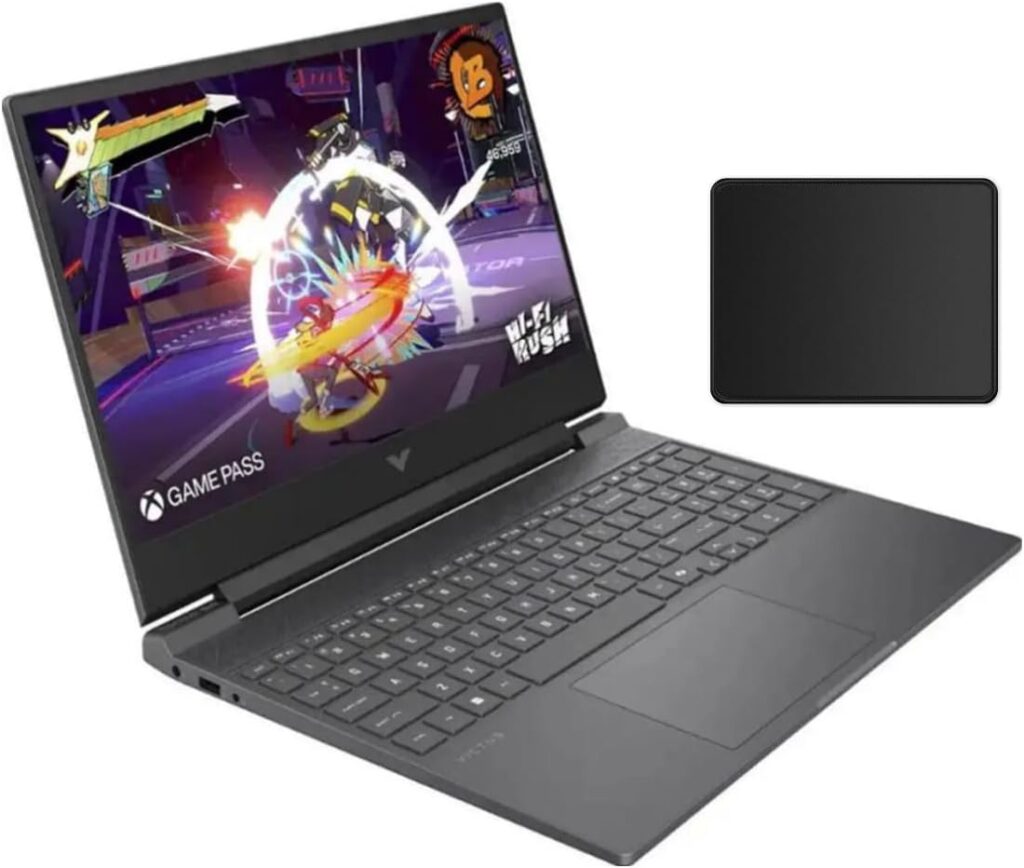
Let’s be honest: not everyone wants a laptop that screams “I’M A GAMER!” with aggressive angles and massive logos. If you need a machine that you can pull out in a strict boardroom meeting or a quiet college library without drawing eyes, the HP Victus 16 is your absolute best bet. It features a beautifully minimalistic design with a simple ‘V’ logo and clean, sharp edges.
Don’t let the corporate look fool you, though. Underneath that calm exterior is a fully capable RTX 4060 paired with a solid 14th Gen Intel Core i5 processor. It runs games incredibly smooth, and HP’s Omen Gaming Hub software allows you to tune the fan curves down to near-silent levels for casual tasks.
Key Specifications:
- Processor: Intel Core i5-14450HX (10 Cores, 16 Threads, up to 4.8GHz)
- Graphics: NVIDIA GeForce RTX 4060 Mobile (8GB GDDR6, 120W TGP)
- Memory: 16GB DDR5 5200MHz
- Storage: 512GB PCIe Gen4 NVMe SSD
- Display: 16.1-inch FHD (1920×1080) IPS, 144Hz
Why it Rocks (Pros):
- Ultra-clean, professional aesthetic that fits in anywhere.
- Larger 16.1-inch display gives an immersive gaming experience.
- Excellent, clear top-firing speakers compared to the competition.
What’s Annoying (Cons):
- The display lid has some noticeable wobble if you move around.
- The plastic keyboard deck flexes slightly under heavy pressure.
Our Verdict: The HP Victus 16 is perfect for the low-profile gamer. It delivers identical high-end frame rates as its louder competitors but wraps them in a professional package that goes anywhere.
How to Pick the Right Budget Rig: Final Buying Guide Tips
Time needed: 5 minutes
When you’re shopping with a firm $1000 limit in 2026, keep these three basic rules in mind to make sure you don’t get ripped off:
- Prioritize the GPU Wattage
Not all RTX 4060s are created equal. A card running at 45W will perform significantly worse than a card running at 140W. Look for laptops like the ASUS TUF or Lenovo LOQ that give the graphics card plenty of power to breathe.
- Don’t Panic About Storage or RAM Numbers
Almost all budget laptops under $1000 let you pop the back cover open and upgrade the RAM and storage down the road. If you find an amazing deal on an RTX 4060 laptop that only has 8GB of RAM or 512GB of storage, buy it anyway! You can easily upgrade it yourself for cheap later on.
- Check the Screen Color Accuracy
Many cheap gaming laptops use dim, washed-out displays to cut costs. If you plan to edit photos or videos, make sure to pick an option like the ASUS TUF A15 or Acer Nitro V 16 that specifically lists 100% sRGB color coverage.
FAQs
Honestly? For 1080p gaming, yeah, you are still totally fine. Don’t let the spec-snobs on Reddit scare you into thinking your laptop is going to explode. If you try to crank up a horribly unoptimized AAA game to Ultra settings with heavy ray tracing, you might hit a wall and see some stuttering. But if you’re realistic, stay at 1080p, and stick to a mix of High settings, 8GB of VRAM is plenty to keep your gameplay buttery smooth.
That used to be the absolute truth a few years back, but thermal design has gotten way better. Rigs like the TUF A15 and Lenovo LOQ have massive heat pipes and aggressive fan curves. Will they get hot? Absolutely—if you play on your bed blankets and block the intake vents, your laptop will feel like a toaster. But as long as you keep it on a flat desk and don’t mind a bit of fan noise when the action gets heavy, these machines are built to survive long sessions without throttling.
Here is the straight truth: if you want to jump in and play the latest games with your friends tonight, pull the trigger. Pushing your budget up to $1300 or $1400 usually just gets you a slightly fancier metal chassis, a slightly brighter screen, or a bit more RGB lighting—it doesn’t magically give you double the frame rates. The sweet spot for pure value is right around the $900–$1000 mark this year, so you really aren’t missing out on much by keeping that extra cash in your pocket.

Hi, my name is Burak. I am a mechanical engineer. I have been writing laptop reviews for the Engineering Laptops website since 2020. Please feel free to contact me if you have any questions.





