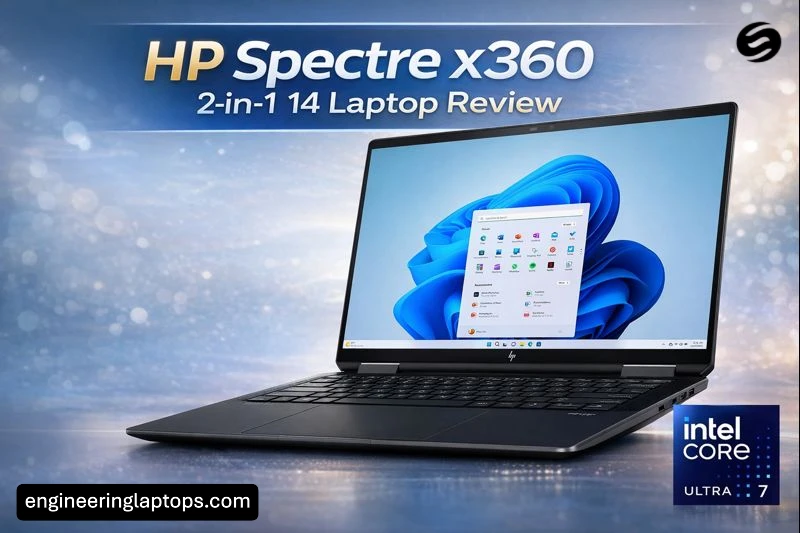
A premium convertible that actually feels premium – this is our HP Spectre x360 2-in-1 14 Laptop Review.
Estimated reading time: 6 minutes
Key Takeaways
- The HP Spectre x360 2-in-1 14 Laptop offers a premium design with solid build quality and a versatile 360-degree hinge.
- It features a stunning 14-inch OLED display, providing excellent color richness and sharpness for various tasks.
- Powered by Intel Core Ultra processors, it delivers smooth performance for multitasking and creative work.
- The battery life is strong, allowing for a full day of typical use without frequent charging.
- While it has a premium price and limited ports, it excels as a reliable device for professionals and creators.
The HP Spectre x360 14 is one of those laptops that immediately gives you confidence when you open the lid. It looks refined, feels solid in your hands, and quietly suggests that HP knows exactly who this machine is for. This isn’t just another 2-in-1 laptop — it’s aimed at professionals, creators, and everyday users who want flexibility without giving up performance or style.
After spending time with the Spectre x360 14, it becomes clear why this model has built such a strong reputation. It blends design, power, and practicality in a way that feels natural rather than forced.
Table of contents
- First impressions: design that stands out
- Display: where the Spectre truly shines
- Performance: smooth and reliable for daily work
- Battery life: built for real-world use
- Keyboard, touchpad, and audio
- Ports and connectivity
- HP Spectre x360 14 – Key specifications
- Pros and cons
- Who is the HP Spectre x360 14 for?
- Frequently asked questions
- Final thoughts
- How to Decide if the HP Spectre x360 14 Is the Right Laptop for You
First impressions: design that stands out
HP has mastered the art of subtle luxury with the Spectre lineup. The aluminum body feels sturdy and well-balanced, with clean lines and polished edges that catch the light without looking flashy. It’s slim, but not fragile. Light, but not flimsy.
The 360-degree hinge is smooth and firm, making it easy to switch between laptop, tent, stand, and tablet modes. Whether you’re typing at a desk, presenting slides, or sketching with the stylus, the transitions feel effortless.
This is the kind of laptop that looks just as good in a café as it does in a boardroom.
Display: where the Spectre truly shines
The 14-inch OLED display is easily one of the strongest reasons to choose this laptop. The 3:2 aspect ratio gives you more vertical space, which makes a real difference when reading articles, editing documents, or browsing the web.
Colors are rich, blacks are deep, and text looks incredibly sharp. Watching movies, editing photos, or simply scrolling through content feels more immersive than on standard widescreen panels. Touch response is fast and accurate, and for supported models, the higher refresh rate adds a noticeable smoothness.
If you care about screen quality, the Spectre x360 14 delivers an experience that’s hard to beat in this size class.
Performance: smooth and reliable for daily work
Powered by modern Intel Core Ultra processors, the Spectre x360 14 handles everyday tasks with ease. Multitasking feels fluid, apps open quickly, and performance stays consistent during long work sessions.
This laptop is well-suited for:
- Office work and multitasking
- Web browsing with dozens of tabs
- Photo editing and light video editing
- Coding and development work
- Streaming and content consumption
While it’s not designed as a gaming or heavy rendering machine, it holds its own remarkably well for a thin and portable convertible.
Battery life: built for real-world use
Battery life is another strong point. In typical daily use — browsing, writing, video calls, and media playback — the Spectre x360 14 can comfortably last most of the day. You won’t constantly be hunting for a charger, which makes it a reliable companion for travel and long workdays.
Fast charging support also helps when you’re short on time and need a quick top-up.
Keyboard, touchpad, and audio
Typing on the Spectre x360 14 is genuinely enjoyable. The keyboard offers good key travel, clear feedback, and a layout that feels natural even during long writing sessions. The touchpad is spacious, responsive, and precise.
Audio quality is better than expected for a slim laptop. The speakers deliver clear vocals and decent depth, making video calls, music, and streaming more enjoyable without immediately reaching for headphones.
Ports and connectivity
To keep the design clean and compact, HP focuses mainly on USB-C and Thunderbolt ports. This works well with modern accessories and docks, but users with older peripherals may want a small adapter.
Wireless connectivity is fast and stable, keeping up with demanding workflows and high-speed networks.
HP Spectre x360 14 – Key specifications
| Feature | Details |
|---|---|
| Display | 14-inch OLED touchscreen, 3:2 aspect ratio |
| Processor | Intel Core Ultra series |
| RAM | Up to 32 GB |
| Storage | Up to 2 TB SSD |
| Graphics | Integrated Intel graphics |
| Battery | Long-lasting, fast-charging support |
| Weight | Lightweight for a premium 2-in-1 |
| Form factor | Convertible (360-degree hinge) |
Exact specifications may vary depending on configuration and region.
Pros and cons
Pros
- Stunning OLED display with practical 3:2 ratio
- Premium build quality and elegant design
- Strong everyday performance
- Comfortable keyboard and responsive touchpad
- Flexible 2-in-1 form factor
Cons
- Limited selection of full-size ports
- Premium price compared to standard laptops
- Not intended for heavy gaming or advanced 3D workloads
Who is the HP Spectre x360 14 for?
This laptop is ideal for professionals who want a polished device, creators who value screen quality, and users who appreciate flexibility. If you take notes, attend meetings, edit content, and consume media on the same device, the Spectre x360 14 fits naturally into that lifestyle.
If your work involves heavy rendering, advanced gaming, or constant use of legacy ports, a more specialized machine might suit you better.
Frequently asked questions
Yes. Its display, keyboard, and performance make it an excellent choice for daily professional use.
For note-taking, reading, and light creative tasks, it works very well as a tablet thanks to the touchscreen and stylus support.
If you value build quality, screen excellence, and versatility, it justifies its premium position.
Final thoughts
The HP Spectre x360 2-in-1 14 is a laptop that feels thoughtfully designed from start to finish. It doesn’t try to be everything at once, but what it does, it does exceptionally well. With its beautiful display, dependable performance, and refined design, it stands out as one of the most balanced premium convertibles available today.
For users who want a single device that looks great, works smoothly, and adapts to different ways of working, the Spectre x360 14 is a choice you’re unlikely to regret.
How to Decide if the HP Spectre x360 14 Is the Right Laptop for You
Time needed: 5 minutes
- Check if the display matches your daily work
The HP Spectre x360 14 features a 14-inch OLED touchscreen with a 3:2 aspect ratio, making it ideal for reading, writing, design work, and media consumption. If screen quality and vertical space matter to you, this step alone may be a deciding factor.
- Evaluate performance for your real-world tasks
Powered by Intel Core Ultra processors, the Spectre x360 14 is built for smooth multitasking, office work, content creation, and everyday productivity. Make sure its performance level aligns with how you actually use your laptop, not just benchmarks.
- Decide if the 2-in-1 design fits your lifestyle
With its 360-degree hinge and touchscreen support, this laptop easily switches between laptop, tablet, and presentation modes. If you take notes, attend meetings, travel often, or enjoy flexible work setups, this design can significantly improve your workflow.

Hi, my name is Burak. I am a mechanical engineer. I have been writing laptop reviews for the Engineering Laptops website since 2020. Please feel free to contact me if you have any questions.