
Estimated reading time: 19 minutes
Key Takeaways
- Frustration arises when dongles fail, leading many to prefer laptops with built-in Ethernet ports for reliable connections.
- Interest in laptops featuring RJ45 ports has increased as users seek stable network connections over Wi-Fi’s inconsistency.
- The article reviews the best laptops with ETHERNET PORTs for 2026, focusing on gaming, corporate use, and overall value.
- Recommendations include ASUS ROG Strix G16 for gamers and Lenovo ThinkPad P16 Gen 3 for professionals needing powerful specs.
- Consider the intended use and configuration before buying, especially for models where Ethernet ports depend on processor choices.
Table of contents
There’s a specific kind of frustration that only happens when a dongle fails halfway through something important.
Mine gave up last spring. I was pushing about fifteen gigabytes of project files to a client’s server, the little USB-C hub got warm, the link dropped, and the transfer rolled all the way back to zero. I sat there staring at the progress bar for a good thirty seconds before it sank in. That was the day I decided my next laptop would have a proper Ethernet jack built into the side of it, no adapters involved.
Turns out plenty of people arrived at the same conclusion. Interest in laptops with built-in RJ45 ports has been climbing for three straight years, and it isn’t nostalgia. It’s people who’ve discovered that Wi-Fi 7 is brilliant right up until your neighbour starts a video call, at which point your ping decides to go on holiday.
The good news for 2026: the port is back. Not everywhere, and — importantly — not on every configuration of every model. But manufacturers finally worked out that a decent slice of their customers would happily give up half a millimetre of thickness for a connection that doesn’t renegotiate itself at random.
These are the five laptops I’d genuinely put money on right now, judged on the things that actually matter: port speed, how the machine behaves under sustained load, and whether it’s worth owning for reasons beyond the jack.
The Short Version
| Laptop | Best For | Ethernet | Rough Street Price |
|---|---|---|---|
| ASUS ROG Strix G16 (2026) | Gaming and streaming | 2.5 Gigabit | $2,000 – $2,800 |
| Lenovo ThinkPad P16 Gen 3 | CAD, simulation, local AI | 2.5 Gigabit | $3,500 – $6,000+ |
| Dell Pro 16 Plus (PB16250 / PB16255) | Managed corporate fleets | 1 Gigabit | $1,100 – $1,800 |
| Lenovo ThinkPad L16 Gen 2 | Value business workhorse | 1 Gigabit | $850 – $1,300 |
| Acer Nitro V 16 AI (ANV16 series) | Budget gaming and students | 1 Gigabit (Killer E2600) | $750 – $1,100 |
Does Anyone Still Need a Wired Connection?
Let me be honest with you: if you’re checking email and watching videos, no. Wi-Fi 7 handles that beautifully and you can stop reading here.
Wired still wins in four specific situations, though, and if any of them describe your life, the port stops being optional.
Competitive gaming. It isn’t about raw speed, it’s about jitter. A cable gives you a steady 1–3 ms to your router. Wi-Fi gives you 3 ms most of the time and 40 ms whenever the flat upstairs fires up a stream. That inconsistency is exactly what makes you feel half a beat behind in a firefight, and no amount of fiddling with router settings fixes it.
Moving big files locally. Pushing 200 GB of raw footage to a network drive over Wi-Fi is an exercise in patience and quiet prayer. Over 2.5 Gigabit it’s a coffee break.
Locked-down networks. Banks, hospitals, government offices, factories, university labs — plenty of them still run wired-only VLANs for security reasons. No port means no network, and you will not win that argument with the IT department.
Places where the Wi-Fi is simply bad. Hotels, conference venues, older buildings with too much concrete. There’s usually a wall jack sitting right there doing nothing, because nobody’s laptop can talk to it anymore.
Gigabit or 2.5 Gigabit — Does It Matter?
For most people, honestly, no. Your home internet is almost certainly slower than 1 Gbps, so a Gigabit port isn’t your bottleneck.
Where 2.5 Gigabit earns its keep is traffic that never leaves your building: NAS backups, editing video straight off a network drive, shuffling virtual machine images around a lab. If your router and switch also speak 2.5 Gigabit, you’ll see roughly two and a half times the throughput on those internal transfers. If they don’t, you’ve paid for a number you can’t use.
My rule: go 2.5 Gigabit if you already own multi-gig networking gear, or you’re planning to within a couple of years. Otherwise Gigabit is perfectly fine and you shouldn’t let a spec sheet push you around.
How I Narrowed It Down
Four rules before anything made the shortlist.
The port has to be built in — “supports Ethernet via the included adapter” is just a dongle with a marketing budget. The rest of the laptop has to be genuinely good, because plenty of mediocre machines have RJ45 jacks and a port isn’t a personality. It has to be currently buyable, not a 2022 model gathering dust with a discount sticker. And thermals and repairability count, because a laptop you can open, clean and upgrade outlives one you can’t by years.
Right. Into it.
Best Laptops With an Ethernet Port in 2026: 5 Machines Worth Your Money
1. ASUS ROG Strix G16 (2026) — The One Most Gamers Should Buy

If you want a single machine that handles wired gaming without compromise, this is where I’d start. ASUS reworked the chassis for 2026 specifically around being opened and upgraded, which is rarer than it ought to be at this price.
The 2.5 Gigabit port on the left flank is why it’s here, but the reason I’d actually own one is the pairing of that 300Hz Nebula panel with a cooling system that doesn’t sound like a hairdryer having a crisis.
Specifications
- Processor: Intel Core Ultra 9 290HX Plus — 24 cores, 8 performance cores up to 5.5 GHz, 16 efficiency cores
- Graphics: Up to NVIDIA GeForce RTX 5080 Laptop, up to 175W in Manual mode
- Display: 16-inch, 2560×1600, 300Hz, 16:10, 100% DCI-P3, ROG Nebula panel
- Memory: Up to 32+32 GB DDR5 across two SO-DIMM slots, user-upgradeable
- Storage: Up to 2 TB PCIe Gen4 SSD with tool-less Q-Latch swapping
- Ethernet: 2.5 Gigabit RJ45
- Other ports: 2× Thunderbolt 5 with DisplayPort 2.1 and power delivery, 3× USB 3.2 Gen 2 Type-A, HDMI 2.1, 3.5mm combo jack
- Wireless: Wi-Fi 7, Bluetooth
- Battery: 90 Wh, 380W adapter, 100W USB-C charging supported
- Weight: 2.7 kg
- Operating system: Windows 11
What’s good
- Real 2.5 Gigabit, roughly double the local throughput of most rivals here
- Tool-less access to memory, storage and the fans — genuinely unusual
- Two Thunderbolt 5 ports running at 80 Gbps
- The 300Hz panel has proper colour coverage, so it’s usable for editing too
- Vapour chamber and tri-fan cooling keep sustained clocks high instead of sagging after ten minutes
- 100W USB-C charging means the 380W brick can stay home on light days
What’s not
- 2.7 kg plus that power brick is a serious commitment to carry anywhere
- A few owners have reported mild backlight bleed on the non-OLED panels
- Battery life while gaming is short, as it is for everything in this class
- Armoury Crate is still heavier software than anyone asked for
- Pricing sits firmly in premium territory
Buy it if: you play ranked, you stream, or you want a desktop replacement you can still upgrade in two years without buying a new laptop.
2. Lenovo ThinkPad P16 Gen 3 — For People Whose Work Melts Normal Laptops
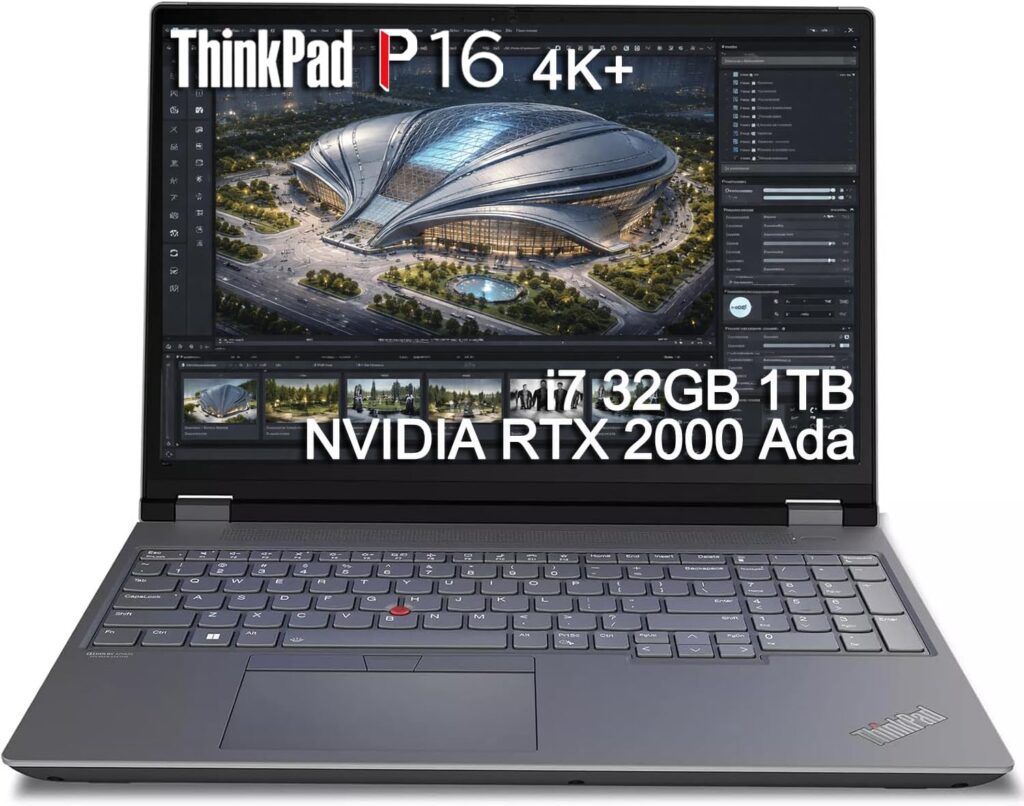
This thing is a beast, and I mean that with affection. It’s roughly twice as thick as a normal ThinkPad, and the back looks like a small server — two enormous exhaust vents with a row of ports nestled between them.
I’d argue it has the most complete port selection on any laptop currently sold. Two Thunderbolt 5, one Thunderbolt 4, HDMI 2.1, a full SD Express 8.0 reader, two USB-A, and a 2.5 Gigabit jack running on Intel’s I226-V controller.
It’s also the machine to look at if you’re running AI models locally, because it takes up to 192 GB of memory and three separate SSDs.
Specifications
- Processor: Intel Core Ultra HX Series, up to Core Ultra 9 275HX — 24 cores, 8 performance cores to 5.4 GHz, 36 MB L3 cache
- Graphics: Up to NVIDIA RTX PRO 5000 Blackwell
- Display: 16-inch, up to 3200×2000 Tandem OLED touchscreen; FHD+ IPS on base configurations
- Memory: Up to 192 GB DDR5 across four SO-DIMM slots
- Storage: Up to 12 TB across three PCIe Gen5 M.2 slots
- Ethernet: 2.5 Gigabit RJ45, rear-mounted, Intel I226-V
- Other ports: 2× Thunderbolt 5 at 80 Gbps (rear), 1× Thunderbolt 4 (left), 2× USB-A 10 Gbps, HDMI 2.1 driving 8K/60, SD Express 8.0 reader, optional smart card slot
- Wireless: Wi-Fi 7 2×2 MU-MIMO, optional cellular
- Weight: 2.5 kg
- Operating system: Windows 11 Pro, with Ubuntu 24.04 and RHEL 10 certification
What’s good
- Ethernet, power and video all live at the back, so your desk stays untangled
- An absurd memory ceiling that local model inference and large simulations actually use
- Probably the most repairable ThinkPad Lenovo has ever built
- Software certifications for CAD, CAE and creative workflows
- Still the best keyboard in the business, numpad included
- Linux certified out of the box, which matters more than vendors like to admit
What’s not
- Expensive; base configurations start around $3,500 and climb quickly from there
- 2.5 kg and thick — this is a desk machine that occasionally travels, not a travel machine
- 2.5 Gigabit is solid but not remarkable on a flagship at this price in 2026
- Sustained performance is limited by the cooling ceiling rather than the silicon
- You’ll want the OLED, and the OLED costs real money
Buy it if: you do simulation, CAD, local AI development, or video work that lives on network storage. If your day involves a render queue and a NAS, the price makes sense.
3. Dell Pro 16 Plus — The Corporate Pick (With One Big Catch)
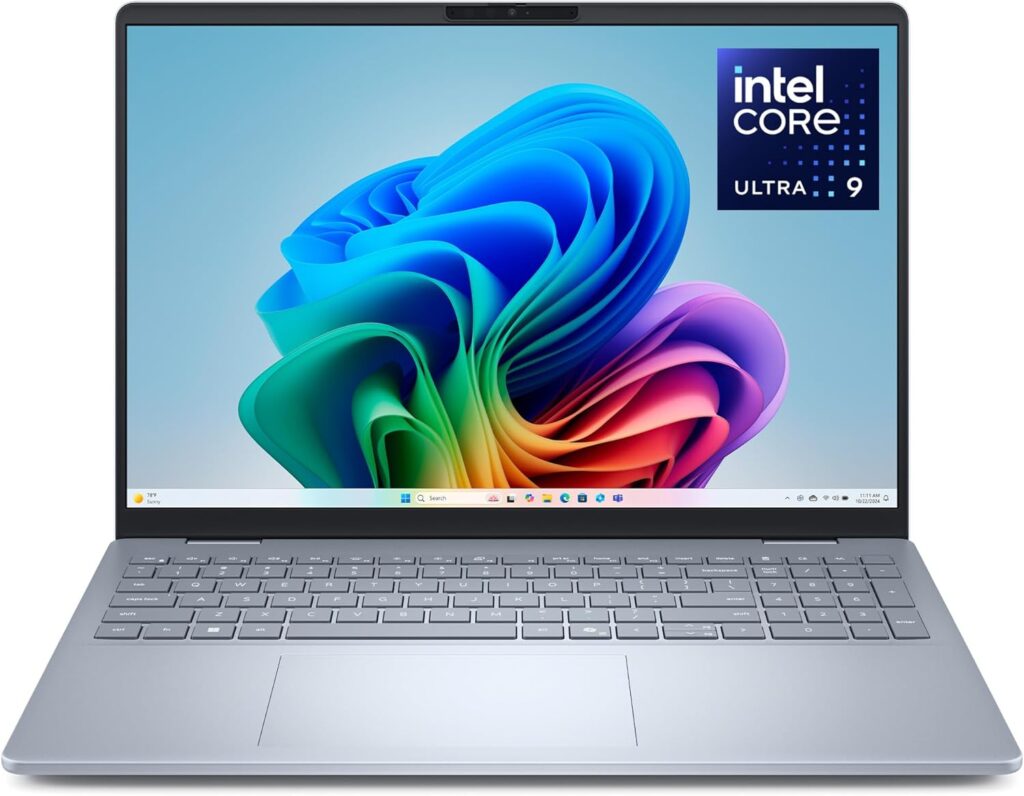
Dell replaced the old Latitude 5550 with this, and the aluminium chassis is a real improvement — no flex in the lid, a hinge that holds position properly, and a keyboard that stays comfortable through an eight-hour day.
Now read this bit carefully, because it’s the single biggest trap in this whole category.
The RJ45 port on the Dell Pro 16 Plus only exists on models built around Core Series or Core Ultra 200U Series processors. Configure it with a Lunar Lake Core Ultra 200V chip — the ones with the best battery life and the Copilot+ badge — and there is no Ethernet port at all. Dell doesn’t hide this exactly, but it’s buried in a footnote, and I’ve watched people order the wrong one twice now.
So: 200V for endurance, 200U or Core Series for the jack. Decide which one you actually need before you click buy.
Specifications
- Processor: Intel Core Ultra 200U/200V Series (PB16250) or AMD Ryzen AI PRO 300 Series (PB16255)
- Graphics: Integrated Intel Arc or AMD Radeon
- Display: 16-inch, 1920×1200 IPS, anti-glare
- Memory: Up to 64 GB — soldered on the V-series, SO-DIMM on U-series and AMD models
- Storage: Up to 2 TB PCIe SSD
- Ethernet: 1 Gigabit RJ45, Core Series and Core Ultra 200U configurations only
- Other ports: 2× Thunderbolt 4 with DisplayPort 2.1 Alt Mode and power delivery, 2× USB 3.2 Gen 1 Type-A, HDMI 2.1, microSD, headset jack, optional nano-SIM and smart card reader
- Wireless: Wi-Fi 7, Bluetooth, optional 5G
- Chassis: Aluminium, 21.35 mm at its thickest
- Weight: From 1.84 kg
What’s good
- Properly good aluminium build for a mainstream commercial machine
- vPro management and the full enterprise security stack for IT teams
- Both USB-C ports charge, so which side the outlet is on stops mattering
- Optional 5G — wired at the desk, cellular in the field
- The AMD configurations offer noticeably stronger multi-core performance
- Serviceable and consistent across large deployments
What’s not
- The Ethernet port vanishes on Lunar Lake configurations — the big one
- The base display is uninspiring; fine for spreadsheets, flat for anything with colour in it
- V-series models support only three external displays in total
- Modest multi-threaded performance on the Intel U-series options
- No discrete graphics option at all
Buy it if: you’re buying for a company, you work hybrid on a managed network, or your IT team hands out wired-only VLANs. Just check the processor line before ordering. Please.
4. Lenovo ThinkPad L16 Gen 2 — Boring in the Best Possible Way

The L-series is the ThinkPad nobody writes headlines about, and that’s precisely why it’s good value. It sits above the E-series in build quality without reaching T-series prices, and Lenovo hasn’t quietly removed anything that matters.
It doesn’t have a quick processor. It has no graphics card worth mentioning. What it does have is something increasingly rare in 2026: DDR5 SO-DIMM slots you can actually upgrade, a real Ethernet jack, and a chassis that runs cool and stays quiet. For a machine that sits on a desk and gets replaced every five years rather than every two, those are exactly the right priorities.
Specifications
- Processor: Intel Core Ultra 200U Series, or AMD Ryzen with Zen 4 and Zen 5 options
- Graphics: Integrated
- Display: 16-inch, 1920×1200 IPS, up to 400 nits, touchscreen optional
- Memory: DDR5 SO-DIMM up to 64 GB, user-upgradeable
- Storage: PCIe SSD, user-replaceable
- Ethernet: 1 Gigabit RJ45 on the left side
- Other ports: 2× Thunderbolt 4 (USB4 40 Gbps, PD 3.1, DisplayPort 2.1), 2× USB-A 3.2 Gen 1, 1× USB-A 2.0, HDMI 2.1 at 4K/60, headphone and mic combo, optional smart card reader, Kensington lock
- Wireless: Wi-Fi 6E or Wi-Fi 7 depending on configuration
- Durability: MIL-STD-810H tested
- Extras: Fingerprint reader, infrared webcam, backlit keyboard with numpad
What’s good
- The best price-to-ports ratio on this entire list
- Upgradeable memory and storage, which is getting hard to find at any price
- The ThinkPad keyboard and TrackPoint are still excellent
- Runs cool and near-silent under normal office loads
- MIL-STD-810H certification and a spill-resistant deck
- Highly repairable, with service parts that are easy to source
What’s not
- U-series and mainstream Zen chips — this is not a performance machine and never pretends to be
- 1920×1200 on a 16-inch screen looks a little coarse if you sit close
- More plastic in the chassis than the Dell Pro or a T-series
- The wireless module varies between SKUs, so check before ordering
- Nobody has ever bought an L16 because of how it looks
Buy it if: you run a small business, you freelance, you do accounting work, or you’re a student who still needs a real port. It’s a laptop that works for five years and never asks for attention.
5. Acer Nitro V 16 AI — The Budget Answer
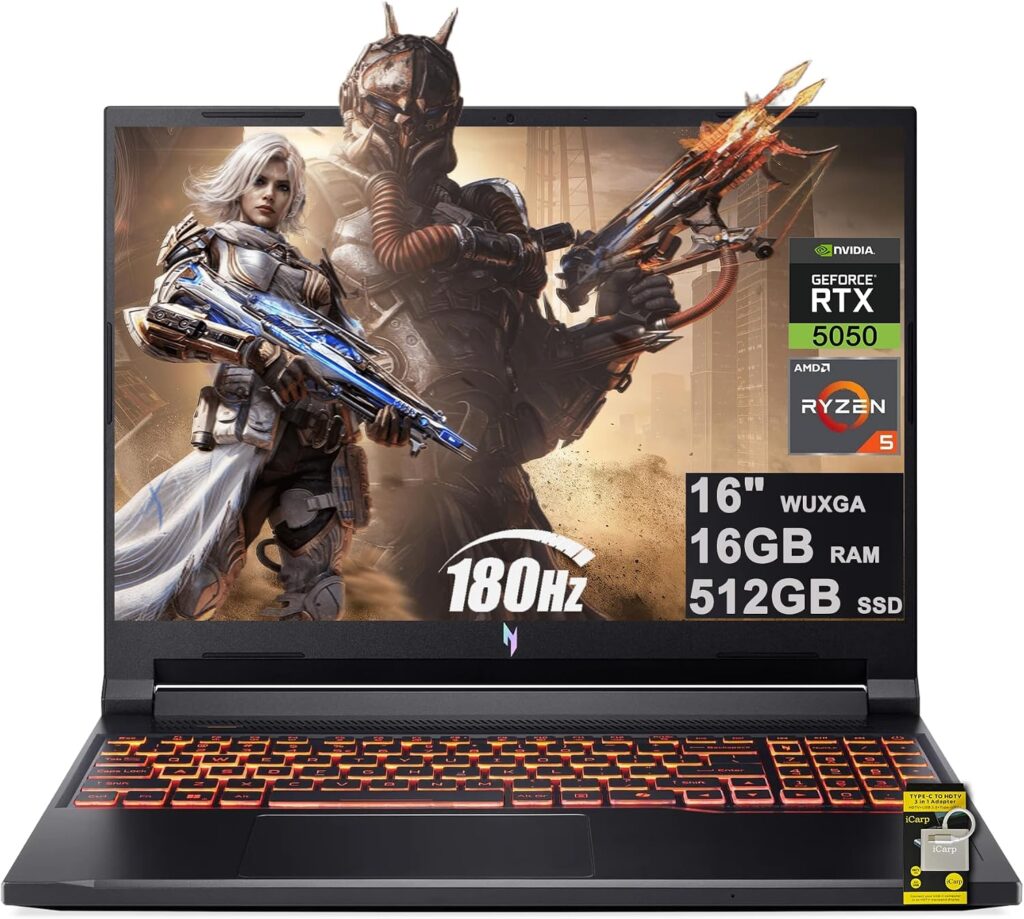
I keep recommending this one to people putting together a first gaming setup, and the reason is simple: it gets the important things right and cuts corners in places you can live with.
The network controller is a Killer E2600, which supports DoubleShot Pro — the feature that lets the laptop use Wi-Fi and Ethernet at the same time, routing game traffic down whichever link is behaving better. On a budget machine, that’s a legitimately useful trick.
One warning, and it matters: “Nitro V 16 AI” is a family, not a product. ANV16-41, ANV16-61, ANV16-42, ANV16-72 and others are all floating around with different processors, different graphics, and — critically — very different screens. Check the exact model number before you pay for anything.
Specifications
- Processor: AMD Ryzen 240, Ryzen 250 or Ryzen 7 260 AI, or Intel H-series depending on sub-model
- Graphics: NVIDIA GeForce RTX 5050 or RTX 5060 Laptop, up to roughly 100W
- Display: 16-inch, 1920×1200 at 165Hz or 180Hz, or 2560×1600 at 180Hz IPS
- Memory: 16 GB DDR5, upgradeable
- Storage: 512 GB to 1 TB PCIe SSD, second M.2 slot on most configurations
- Ethernet: 1 Gigabit RJ45, Killer E2600 with DoubleShot Pro
- Other ports: USB4 Type-C at 40 Gbps (rear), 2× USB-A 3.2 Gen 2 at 10 Gbps, 1× USB-A 3.2 Gen 1, HDMI 2.1 (rear), microSD reader, 3.5mm combo jack, Kensington lock
- Wireless: Killer Wi-Fi 6 or 6E, Bluetooth 5.2 or newer
- Battery: 76 Wh with a 135W adapter
- Weight: Around 2.4 kg
What’s good
- DoubleShot Pro genuinely helps when your network is congested
- Surprisingly strong battery life — some configurations clear ten hours in light use
- HDMI and USB-C sit at the back, which keeps the desk tidy
- USB4 at 40 Gbps on a budget laptop is unusual and very welcome
- A microSD reader, which most gaming laptops skip entirely
- Aluminium lid and base on the 16S variants lift the feel above the price tag
What’s not
- The base display covers only about 57% of sRGB. Colours look washed out. Pay up for the 180Hz or 2560×1600 panel
- Wi-Fi 6 or 6E rather than Wi-Fi 7
- Heavily plastic chassis on the standard models
- The model numbering across the family is genuinely confusing
- RTX 5050 configurations feel underpowered once you push past 1080p
Buy it if: you’re a student, or this is your first gaming laptop, and you want a wired connection without spending two thousand. Get the better screen. I cannot stress that enough.
Side by Side
| ROG Strix G16 | ThinkPad P16 G3 | Dell Pro 16 Plus | ThinkPad L16 G2 | Acer Nitro V 16 AI | |
|---|---|---|---|---|---|
| Ethernet | 2.5 Gigabit | 2.5 Gigabit | 1 Gigabit (config-dependent) | 1 Gigabit | 1 Gigabit (Killer E2600) |
| Display | 16″ 2.5K 300Hz | 16″ up to 3.2K OLED | 16″ 1920×1200 | 16″ 1920×1200 | 16″ up to 2.5K 180Hz |
| Top processor | Ultra 9 290HX Plus | Ultra 9 275HX | Ultra 7 / Ryzen AI PRO | Ultra 200U / Ryzen | Ryzen 7 260 AI |
| Top graphics | RTX 5080 | RTX PRO 5000 | Integrated | Integrated | RTX 5060 |
| Max memory | 64 GB | 192 GB | 64 GB | 64 GB | 32 GB |
| Thunderbolt | 2× TB5 | 2× TB5 + 1× TB4 | 2× TB4 | 2× TB4 | USB4 40 Gbps |
| Wireless | Wi-Fi 7 | Wi-Fi 7 | Wi-Fi 7 | Wi-Fi 6E / 7 | Wi-Fi 6 / 6E |
| Weight | 2.7 kg | 2.5 kg | 1.84 kg | ~1.9 kg | ~2.4 kg |
| Upgradeable RAM | Yes | Yes | U-series and AMD only | Yes | Yes |
So Which One Is Yours?
You play competitively and you’re plugged into a switch. ROG Strix G16. The 2.5 Gigabit port and the 300Hz panel belong together.
You run simulations, CAD, or models on your own hardware. ThinkPad P16 Gen 3. Nothing else here takes 192 GB of memory.
Your company’s network is wired-only and your machine is managed. Dell Pro 16 Plus — with a 200U or Core Series processor, not a 200V.
You want something reliable for office work without overspending. ThinkPad L16 Gen 2. Dull, dependable, cheap to keep alive.
You’re a student and money is tight. Acer Nitro V 16 AI, with the upgraded screen. Skip the base panel entirely.
Things Nobody Mentions Until It’s Too Late
A handful of observations from years of dealing with this stuff.
Your speed is capped by the weakest link in the chain. A 2.5 Gigabit laptop plugged into a Gigabit switch runs at Gigabit. Obvious when someone says it out loud, and forgotten by everyone the moment they open a shopping tab.
Drop-down jacks are a weak point. Some thin laptops use a hinged RJ45 mechanism to save height. They work, but that little plastic flap is usually the first thing to snap. Full-depth ports last longer, and every machine on this list uses one.
Killer controllers aren’t purely marketing. DoubleShot Pro on the Acer does what it claims. Whether you notice depends entirely on how busy your network is, but the feature is real.
A Thunderbolt dock is a fair alternative — if you never move. If the laptop lives permanently on one desk, a decent TB4 or TB5 dock gives you Ethernet plus everything else down a single cable. It’s when you’re travelling, or plugging into someone else’s network for twenty minutes, that a built-in port stops being a nicety.
Turn off power saving on the network adapter. Windows will happily throttle your Ethernet controller to save battery, which produces intermittent drops that feel exactly like a hardware fault. Device Manager, find your Ethernet adapter, Power Management tab, untick “Allow the computer to turn off this device to save power.” Do it on day one. It has saved me hours of pointless troubleshooting.
Rear-mounted ports are wildly underrated. The ThinkPad P16 and the Acer both put the important cables at the back. Give it a week and you’ll wonder why every laptop doesn’t.
Common Questions
Do laptops still come with Ethernet ports in 2026? Yes, but they’re clustered in specific categories. Business laptops, mobile workstations and gaming machines still ship with RJ45 jacks. Consumer ultrabooks and premium thin-and-lights have almost entirely dropped them. If you need a port, shop within those three categories and ignore the rest.
Is Ethernet actually faster than Wi-Fi 7? On paper Wi-Fi 7 can beat Gigabit throughput. In practice Ethernet delivers far more consistent latency and throughput, because it isn’t sharing airtime with every other device in the building. For gaming, video calls and long sustained transfers, wired still wins on reliability even where wireless wins on peak numbers.
Can I add an Ethernet port to a laptop that doesn’t have one? Yes — with a USB-C or USB-A adapter, or a Thunderbolt dock. It works perfectly well for stationary use. The downsides are one more thing to carry, one more thing to lose, and adapters that heat up and drop the link during long transfers. Built-in is simply more dependable.
What’s the real difference between 1 Gigabit and 2.5 Gigabit? Roughly two and a half times the speed on your local network. It only matters if your router, switch and the device on the other end all support it too. For plain internet access, Gigabit is almost always more than enough.
Which laptop with Ethernet is best for gaming? The ASUS ROG Strix G16 (2026), because it pairs a 2.5 Gigabit port with an RTX 5080 and a 300Hz display. On a tighter budget, the Acer Nitro V 16 AI and its Killer E2600 controller is the value choice.
Do MacBooks have Ethernet ports? No. No current MacBook includes a built-in RJ45 jack, and Apple has given no sign that’s changing. Mac users need a USB-C or Thunderbolt adapter.
Does a gaming laptop still need Ethernet if it has Wi-Fi 7? Not strictly, but competitive players should still plug in. The advantage isn’t bandwidth, it’s the elimination of latency spikes caused by wireless interference. Those spikes are what lose you fights.
Are there thin and light laptops with Ethernet ports? Very few, and the ones that exist are business machines rather than consumer ultrabooks. The Dell Pro 16 Plus at 1.84 kg is about as light as it gets while keeping a full-depth jack. Below that weight class, you’re almost certainly looking at an adapter.
Where I’d Land
If a friend asked me over coffee, here’s what I’d say: the port matters more than most reviewers admit and less than the forum obsessives insist.
If you play ranked, work on a locked-down network, or move enormous files to local storage, buy a laptop with a real jack and stop thinking about it. The ASUS ROG Strix G16 and the ThinkPad P16 Gen 3 are the two I’d spend my own money on, depending on whether the work is games or engineering.
If you mostly sit at one desk and everything else about a particular laptop is perfect except the missing port, a Thunderbolt dock is a completely reasonable answer. Don’t write off a great machine over one jack.
And whichever way you go, check the exact configuration before you pay. That Dell quirk, where the port quietly disappears on certain processor tiers, is going to catch a lot of people this year. Try not to be one of them.

Hi, my name is Burak. I am a mechanical engineer. I have been writing laptop reviews for the Engineering Laptops website since 2020. Please feel free to contact me if you have any questions.





